Solder Failure Troubleshooting Guide
Urgent, practical guide to diagnosing solder failure across electronics, plumbing, and jewelry. Step-by-step fixes, safety tips, and prevention strategies for reliable joints.


According to SolderInfo, solder failure is most often caused by insufficient heat transfer, contaminated joints, or poor fluxing. The quickest fix is to reflow with clean surfaces and fresh flux, ensure the iron properly contacts the joint, and recheck for wetting. If the repair still fails, rework carefully and inspect for hidden damage.
Understanding solder failure: symptoms and significance
Solder failure is a catch-all term for joints that fail to carry current reliably, crack under mechanical stress, or develop intermittent connections. The term spans electronics, plumbing, and jewelry soldering, and its impact can be severe — from a device that intermittently loses power to a leak-prone plumbing joint or a jewelry clasp that suddenly fails. In many hobby and professional workflows, solder failure traces back to a few repeatable issues: poor heat transfer, surface contamination, flux misapplication, or aging solder alloys. Recognizing symptoms early — dull or pitted joints, hairline cracks, or joints that crumble under slight bending — helps prevent cascading failures. As you diagnose, note whether the failure is intermittent, location-specific, or dependent on temperature changes. This context guides the repair approach and helps you communicate with teammates or clients. In this guide, we use solder failure as a lens to explore robust practices, with practical steps you can apply today. The SolderInfo team emphasizes that systematic troubleshooting reduces waste and protects both equipment and operators.
Common causes across electronics, plumbing, and jewelry
Across disciplines, the same root causes show up in solder failure: insufficient heat transfer due to an underpowered iron, poor contact with the workpiece, or oversized joints that dissipate heat too quickly. Contamination on pads or components — oils, fingerprints, or oxidation — prevents proper wetting. Flux choice and quantity play a critical role: too little flux leaves surfaces dry, too much can be counterproductive, and non-resin flux can leave residues that impede bonding. In electronics, lead-free alloys and smaller components demand precise timing and temperature control, while plumbing problems often hinge on copper pad cleanliness and joint geometry. Jewelry soldering strengthens when you manage temperature gradients and protect heat-sensitive stones or settings. SolderInfo analysis shows that flux quality and tip condition are common differentiators in solder failures, especially for hobbyists and small shops.
Quick diagnostic checks you can perform safely
Start with a visual inspection under good light: dullness, graininess, or corroded pads signal poor wetting. Check the soldering iron tip for oxidation and wear; a worn or dirty tip reduces heat transfer and increases the chance of cold joints. Verify the flux is appropriate for your alloy and that you applied it evenly before tinning the pad or lead. Clean surfaces with isopropyl alcohol or acetone as appropriate, then re-tin your tip and reapply flux to refresh the bonding environment. If the part is heat-sensitive, use a heat sink to protect adjacent components and monitor temperature with a thermocouple or infrared thermometer. Finally, reflow the joint with deliberate, steady heat aiming for a bright, smooth, concave fillet. If you see any sign of mechanical stress, rework with care to restore mechanical integrity before powering the circuit or system.
Step-by-step repair approach for the most common failure mode
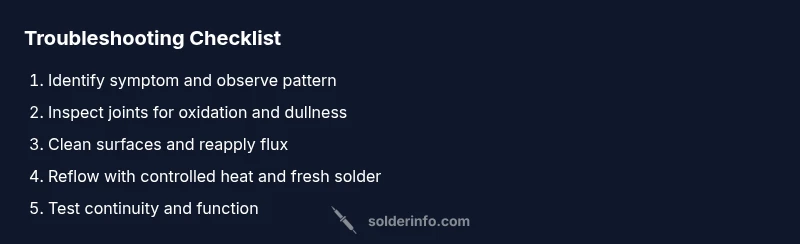
- Prepare the workspace: unplug power, secure the board or fixture, and gather tools. Tip: work on a static-safe mat and wear eye protection.
- Clean and inspect the joint: remove old solder, inspect for corrosion, and verify clean pads. Tip: use a magnifier for small components.
- Re-tin the tip and apply fresh flux: this improves heat transfer and wetting. Tip: ensure flux coverage is even.
- Reflow the joint: apply steady, controlled heat and feed solder to the joint until a smooth fillet forms. Tip: avoid overheating adjacent parts.
- Inspect and test: visually confirm a shiny, concave joint; perform a quick resistance/continuity test if applicable. Tip: use a microscope or loupe for tiny joints.
- Rework if necessary: if cracks or gaps persist, remove and redo the joint or consider replacing the component or pad. Tip: document temperature and time for future reference.
Safety, flux, and best practices to prevent recurrence
Safety first: unplug power, drain capacitors if dealing with higher voltages, and wear eye protection. Use appropriate flux and cores (rosin-core for electronics; acid-core for plumbing where appropriate). Store solder in a clean, dry place to prevent oxidation, and replace worn tools, including tips and sponges. Avoid excessive force on joints; mechanical strain can cause hairline cracks and cold joints. Record the exact flux type, solder alloy, and temperature profile you used so you can reproduce successful results. Regularly cleaning tips and upgrading to a temperature-controlled station reduces recurrent failures. SolderInfo highlights that methodical workflows and quality flux management dramatically reduce repeat issues for professionals and hobbyists alike.
Diagnostic flow: mapping symptoms to causes and fixes
If you notice dull or cracked joints, suspect poor heat transfer. If joints meet resistance or crack under bending, check contamination and oxidation. If residues are visible after cooling, look at flux choice and cleaning steps. For electronics, verify component proximity to heat sources and ensure you used the correct alloy. In plumbing and jewelry, double-check joints for proper geometry and clamping. The recommended fixes progress from simple cleaning and flux refresh to reflow with proper heat and, if needed, replacement of pads or components. Always test thoroughly after each repair and inspect for new signs of distress. The SolderInfo guidance reinforces that a disciplined, incremental approach minimizes risk and maximizes reliability.
Verifying repair and next steps
After repair, re-test under real operating conditions and monitor for any drift in resistance or temperature. If instability persists, re-check the entire network for hidden damage or potential short circuits. Document results and adjust your process accordingly to avoid recurrence. Finally, consider a preventive maintenance plan: schedule periodic inspections, keep spare tips and flux on hand, and standardize a temperature profile for common joint types. The SolderInfo team recommends building a checklist that captures materials used, flux, and temperature settings for future reference.
Steps
Estimated time: 30-45 minutes
- 1
Prepare workspace and safety checks
Power down the system and disconnect power; cover the work area and wear eye protection. Gather tools, flux, solder, and a clean pad or component. This first step ensures a controlled environment for safe repairs.
Tip: Keep a spare tip and sponge ready to maintain heat transfer efficiency. - 2
Inspect joints and clean surfaces
Visually inspect joints with a magnifier, looking for oxidation, dull surfaces, or hairline cracks. Clean the pads and leads with isopropyl alcohol to remove oils and debris before reflow.
Tip: If oxidation is present, gently scrub with a brass sponge or abrasive pad. - 3
Re-tin the iron and apply flux
Re-tin the soldering iron tip to restore heat transfer efficiency. Apply a fresh, appropriate flux to the joint to improve wetting and solder flow.
Tip: Use the correct flux for your alloy (rosin-core for electronics; appropriate plumbing flux where applicable). - 4
Reflow the joint
Apply steady heat with a properly sized amount of solder, focusing heat at the joint rather than the surrounding area. Stop applying heat when the joint forms a smooth, shiny fillet.
Tip: Avoid overheating nearby components and use a heat sink for sensitive parts. - 5
Inspect and test
Examine the joint after cooling for a bright, concave appearance. Perform a continuity or resistance test if possible.
Tip: If the joint looks dull or cracked, rework the joint again or replace the component. - 6
Document and preventive steps
Record the flux, solder, temperature, and dwell time used. Implement a quick-check checklist for future assemblies to prevent recurrence.
Tip: Regular maintenance and proper storage of flux and solder extend joint reliability.
Diagnosis: Intermittent, failing, or visibly defective solder joints in electronics, plumbing, or jewelry work
Possible Causes
- highInsufficient heat transfer due to worn or dirty soldering iron tip
- highContamination or oxidation on pads/leads preventing proper wetting
- mediumImproper flux choice or inadequate flux coverage leading to poor bonding
Fixes
- easyClean/replace the tip, re-tin, reflow with adequate flux and heat control
- easyClean surfaces, re-apply flux, reflow with proper temperature profile and dwell time
- hardReplace affected pads or components and consider heat-sinking adjacent parts
Quick Answers
What is solder failure and how can I identify it?
Solder failure refers to joints that don’t establish or maintain a reliable connection. Common signs are dull, cracked, or blob-like joints, intermittent operation, or mechanical instability. Inspect visually and test with continuity checks to confirm.
Solder failure means the joint isn’t reliable. Look for dull or cracked joints and test with a multimeter to confirm.
Why do joints crack after cooling or under stress?
Cracks often form when thermal expansion or contraction is uneven, or when heat exposure was uneven, causing microcracks in the solder or pad. Proper tip temperature, flux, and technique reduce this risk.
Cracks happen when heat is applied unevenly or the joint is stressed after cooling.
How can flux help prevent solder failure?
Flux cleans and prepares surfaces, improves wetting, and prevents oxidation during soldering. Choosing the right flux for your alloy and applying an adequate amount reduces cold joints and improves reliability.
Flux cleans the surface and helps solder flow smoothly, preventing cold joints.
When should I replace a board rather than repair joints?
If the board has extensive damage, multiple failed joints, or compromised traces, replacement may be more reliable than repairing individual joints. Assess board condition and cost implications.
If the board is broadly damaged, replacement may be wiser than fixing many joints.
Is lead-free solder more prone to cold joints?
Lead-free solder can require higher temperatures and may be more prone to cold joints if heat isn’t managed properly. Use proper temperature control and flux to mitigate this risk.
Lead-free solder can be trickier; manage heat and flux for better joints.
Watch Video
Top Takeaways
- Identify solder failure symptoms early
- Prioritize clean joints and proper flux for reliable wetting
- Use controlled heat and avoid overheating adjacent parts
- Document settings to recreate successful repairs
- Schedule preventive checks to minimize future failures