Troubleshooting Problems with Soldering: A Practical Guide
An urgent, practical guide to diagnose and fix common soldering problems—from cold joints to bridging—featuring step-by-step fixes, safety tips, and prevention guidance for electronics, jewelry, and plumbing.


Most soldering problems stem from heat control, surface prep, and flux choice. The quickest fix is to clean the joint, apply fresh flux, and reflow with a properly heated iron. If joints remain dull or cracked, verify alloy compatibility and inspect for oxidation. This guide walks you through a safe, stepwise diagnostic flow to fix common issues.
Why problems with soldering occur
According to SolderInfo, problems with soldering are typically rooted in three core areas: heat management, surface preparation, and flux effectiveness. When surfaces are dirty, oxidized, or contaminated, solder fails to wet the joint and instead beads, resulting in weak or unreliable connections. Insufficient heat or a dull, dirty tip prevents proper wetting, creating cold joints that look matte and can crack under stress. In some cases, using an incompatible alloy or lead-free solder demands higher heat, risking pad damage or component lift. Understanding these drivers helps you diagnose quickly and prevent future failures.
Common symptoms you should recognize
Detecting the warning signs early saves time and parts. Look for dull, grainy joints that don’t flow; visible gaps at the joint; solder bridges between adjacent pads; lifted pads or lifted copper on the board; and excessive solder on the underside of a joint. Oxidized surfaces and dull tips often accompany poor wetting. If you notice rapid joint failure after thermal cycling, that may indicate thermal stress or mismatched coefficient of expansion between materials. Recognize these patterns to steer toward the correct remedy.
Immediate checks you can perform
Before disassembling or replacing components, perform quick, non-destructive checks:
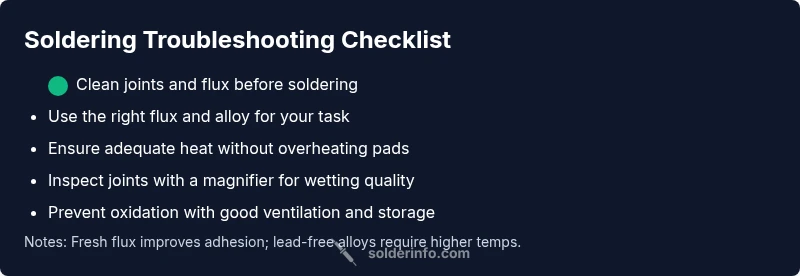
- Verify the work area and power supply are safe and off for electronics work. Clean the tip and board surface with isopropyl alcohol.
- Inspect the tip for wear or oxidation; replace or re-tin if necessary. Ensure flux is fresh and appropriate for the alloy you’re using.
- Reassess the joint geometry: is the pad still intact? Are you applying enough heat without overheating nearby components?
- Test your solder and flux: rosin-core flux is common for electronics, while lead-free alloys may require higher temperatures.
- Use magnification to inspect the wetting line and check for micro-cracks or voids that betray weak joints.
Diagnostic flow overview for troubleshooting
A clear diagnostic path helps you converge on the root cause. Start from the symptom, progress to heat and surface checks, evaluate flux and alloy compatibility, then test with a controlled reflow. If the problem persists, revisit the substrate cleanliness and consider board age or damage. This approach minimizes guessing and accelerates repair time.
Step-by-step fixes for the most common causes
When you identify the root problem, apply targeted fixes with care. Re-tin the tip, re-clean joints, re-apply flux, and reflow with steady, even heat. Replace damaged pads or rework contaminated copper traces if needed. For bridge or short issues, remove excess solder with a wick and reflow cleanly. Always sequence changes to avoid introducing new problems.
Safety, maintenance, and prevention tips
Soldering can pose burn, inhalation, and chemical exposure risks. Work in a well-ventilated area and wear safety glasses. Use a heat sink for sensitive components, unplug devices while you work, and store flux and solder away from children. Regularly inspect tips and replace worn components, and keep cleaning cleaners and isopropyl alcohol within reach for quick surface prep.
When to seek professional help
If you encounter persistent issues such as repeated cold joints on high-value boards, persistent corrosion, or damaged traces that require board-level repair, consult a professional. Complex work like hot air rework or refurbishment of vintage electronics should be handled by experienced technicians to avoid collateral damage.
Steps
Estimated time: 45-60 minutes
- 1
Prepare workspace and safety gear
Set up in a well-ventilated area, unplug equipment, and don safety glasses. Clear the bench of clutter and position the PCB for easy access. Have a damp sponge ready to clean the tip and a small container for used flux.
Tip: Never touch hot components; keep a clean, organized workspace. - 2
Clean surfaces and flux application
Wipe surfaces with isopropyl alcohol and remove old flux residues. Apply a thin line of resin flux to the joint or use rosin-core flux if you’re working with electronics. Ensure the flux covers the pad surface evenly.
Tip: Flux helps metal wet properly and reduces oxidation during heating. - 3
Choose the right solder and set temperature
Select an appropriate alloy for the task (e.g., Sn63-Pb37 or lead-free SnAgCu variants) and confirm your iron is heating to the recommended temperature. Avoid using a cold iron or excessive heat that could lift pads or damage components.
Tip: For lead-free solder, anticipate higher temperatures and adjust your iron accordingly. - 4
Apply heat and feed solder steadily
Place the iron tip at the joint to heat both surfaces, then feed solder to the joint’s hot region—not directly onto the iron. Stop feeding once the joint wets and forms a shiny fillet. Remove heat and allow the joint to cool without movement.
Tip: Use a damp sponge to keep the tip clean during the process. - 5
Inspect, adjust, and clean up
Check for a smooth, shiny fillet with uniform distribution. If you see a dull or grainy joint, reheat and reflow or rework with flux and wick. Clean up residue and re-check for bridges or shorts with a magnifier.
Tip: If a joint is suspicious, rework it rather than risking a cold joint.
Diagnosis: Common soldering symptoms (dull joints, bridges, cold joints, lifted pads)
Possible Causes
- highInsufficient heat at the joint due to a worn tip or heat sink
- highContaminated surfaces or old flux residue preventing wetting
- mediumIncompatible solder alloy or lead-free solder requiring higher heat
- lowOxidation or moisture on copper surfaces
Fixes
- easyReplace or clean the tip; re-tin; ensure the iron maintains stable temperature
- easyClean surfaces with isopropyl and fresh flux; reflow joint with steady heat
- mediumSwitch to compatible alloy or adjust soldering temperature per alloy guidelines
- easyRemove oxidation with a copper scrub or abrasive pad, then re-tin
Quick Answers
What are the most common causes of poor solder joints?
Poor joints are typically caused by dirty or oxidized surfaces, insufficient heat, or improper flux. An incompatible alloy or excessive heat can also degrade joints. Addressing these factors systematically yields reliable results.
Most poor joints come from dirty surfaces, not enough heat, or wrong flux. Check those first, then adjust your alloy and temperature as needed.
Why is my solder not sticking to the metal?
Solder won't wet a surface if the joint area is dirty, oxidized, or lacks flux. Clean the surface, apply fresh flux, and re-tin the tip. Ensure your iron is at the correct temperature for the alloy you’re using.
If solder won’t wet the metal, clean and flux the area, then reheat with the right temperature.
What’s the difference between rosin-core and acid-core flux for electronics?
Rosin-core flux is standard for electronics due to its non-corrosive nature. Acid-core flux is corrosive and generally avoided on electronics, as it can damage copper traces and components.
Rosin flux is used for electronics; acid flux can corrode circuits and should be avoided.
How can I prevent cold joints in the future?
Maintain a clean, prepped surface, use the correct heat, and avoid quick, abrupt movements while soldering. Keep the tip clean and re-tin it regularly to ensure proper heat transfer.
Keep surfaces clean, heat steady, and tip tinned to prevent cold joints.
Should I use lead-free solder for all projects?
Lead-free solders are common for safety and compliance, but they often require higher temperatures and proper flux. If your equipment permits, you can use leaded solder for easier wetting where allowed by regulation.
Lead-free is common but needs higher heat; ensure compliance before choosing.
When should I seek professional help?
If joints repeatedly fail on high-value boards, if you encounter trace damage, or if rework requires hot-air or specialized equipment, consult a pro to avoid further harm.
If joints keep failing on important boards, get professional help.
Watch Video
Top Takeaways
- Identify root cause before replacing components
- Maintain clean surfaces and fresh flux for reliable joints
- Control heat carefully to avoid damage and dull joints
- Use proper alloy and temperature for your solder
- Practice safe, organized soldering habits