How to Renew a Soldering Iron Tip: Step-by-Step Guide
Learn how to renew a soldering iron tip to extend tip life and improve joint quality. This practical guide covers cleaning, tinning, seasoning, and maintenance for electronics, jewelry, and plumbing projects.


With the right steps, you can renew a worn soldering iron tip to restore heat transfer and prevent oxidation. In this guide, you will learn a safe, repeatable routine for cleaning, tinning, and seasoning tips, plus troubleshooting tips to keep your tools dependable across electronics, jewelry, and plumbing work. This is a practical, hands-on approach from SolderInfo.
Why renewing a soldering iron tip matters
A clean, well-tinned tip transfers heat more efficiently, delivering consistent joints and reducing the risk of cold solder joints. Over time, exposure to heat, air, and flux forms an oxide layer that impedes tinning and increases oxidation. Renewing the tip removes oxides, restores a fresh tin surface, and reduces pitting. This simple maintenance step saves time, lowers scrap, and extends the life of your tool across electronics, jewelry, and plumbing work. By adopting a regular renewal routine, hobbyists and professionals can keep their irons performing at peak levels and minimize rework on critical assemblies. According to SolderInfo, tip health strongly influences heat transfer and wetting, so taking a proactive approach makes complicated repairs easier and safer.
How to assess tip condition and compatibility
Not all tips are created equal. The renewal process works best when the tip is physically accessible and removable, or at least easily replaceable. Check the tip geometry (blade size, conical versus chisel) and confirm compatibility with your iron. Signs you may need to replace rather than renew include heavy corrosion, bent stems, or a tip that cannot tin evenly. When in doubt, have a spare, compatible tip on hand. Matching the tip to your typical work (fine electronics versus heavy copper plumbing) helps you decide how aggressively to renew and whether a replacement is worth the cost.
Safety and workspace setup
Before touching hot metal, unplug the iron and let it cool in a safe, ventilated area. Work on a non-flammable mat, keep solvents away from sparks, and wear eye protection. Use a dedicated stand to prevent accidental burns or tip droppings on the bench. If you work near kids or pets, establish a clean boundary. Good lighting and a clear route to a sink or tray for scrapped solder also reduces accidents. A tidy workspace reduces the chance of thermal shock or accidental tip contact, which can scorch pads or cause injuries. This section borrows practical safety practices from the SolderInfo guidance for maintaining soldering gear.
Cleaning and oxide removal techniques
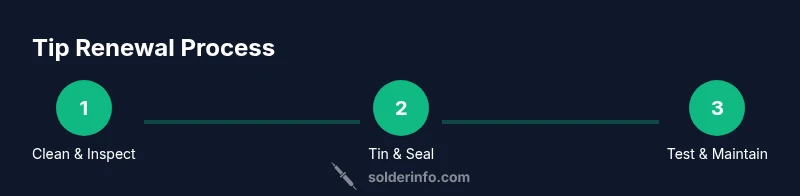
Begin with a cold iron whenever possible and remove the tip if your model allows. Use a brass sponge or brass wool to scrub away loose oxidation, then wipe the surface with isopropyl alcohol to remove contaminants. For stubborn oxide, apply a thin layer of tip tinner or flux and gently re-tin the surface. Avoid aggressively filing or grinding the tip, which shortens its life. The goal is to reveal bright copper beneath any oxide layers so that tin can wet the surface evenly. Document any abnormal wear you observe, such as deep scratches or flattening, and plan for replacement if needed.
Tinning and seasoning for longevity
Tinning coats the tip with a thin, even layer of solder. Heat the tip, apply a small amount of solder, and move the iron slowly to spread the metal across the entire wetted area. Wipe off excess solder to prevent buildup. Seasonal seasoning follows tinning and helps create a protective barrier against oxidation during future use. For best results, use flux that matches your solder alloy and avoid leaving bare copper exposed for long periods. Regular tinning reduces oxide formation and keeps heat transfer consistent, so you get cleaner joints with less effort.
Replacing vs renewing a tip: when to swap
If the tip shows persistent pitting, deep oxidation that won’t tin, or physical damage to the stem, replacement is advisable. Renewing can extend life for healthy tips, but worn, cracked, or deformed tips lose their ability to hold a consistent temperature. In those cases, choose a compatible replacement rather than forcing a renewal. The decision also depends on how often you use the iron and the type of work. For electronics, swapping to a fresh tip is common; for heavy-duty plumbing, a robust tip may endure longer via renewal.
Common mistakes and troubleshooting
Common mistakes include over-oxidizing the tip with excessive flux, overheating during tinning, or neglecting to wipe the tip after use. Always let the tip cool briefly before touching it, and avoid flux from corrosive sources. If heat seems inconsistent, verify temperature settings and ensure the tip is correctly seated. Troubleshooting involves checking for corrosion around the tip base, cleaning the iron barrel, and testing on a copper pad. Remember, small adjustments are often more effective than large changes.
Maintenance schedule and best practices
Create a simple maintenance calendar: inspect tips weekly, tin after use, and re-tin every few sessions for electronics work. Rotate through a couple of tips to avoid wearing one heavily in a single job. Keep your cleaning tools handy and ensure your flux and solder are fresh. Best practices include storing tips dry, cleaning the iron after each project, and resetting the iron temperature after a long job to prevent degradation of coatings.
Practical tips across electronics, jewelry, and plumbing
Electronics: use fine tips and stay within a moderate temperature to avoid damage to PCB traces. Jewelry: thinner tips with slower feeds help with delicate joints. Plumbing: robust tips and slightly higher temperatures work for copper pipes, but protect surrounding materials from heat. In all cases, keep a tidy tip-lubrication routine and re-tin regularly to maximize life. This practical approach aligns with recommendations from SolderInfo for consistent performance.
Tools & Materials
- Soldering iron with adjustable temperature(Tip renewal works best with controlled heat (typical range is model-dependent))
- Replacement tip compatible with your iron(Have a clean spare tip ready if the old one is damaged)
- Brass sponge or brass wool(For pre-cleaning the tip surface)
- Tip tinner or flux remover(Assist oxide removal; use sparingly)
- Rosin-core or no-clean flux(Used during tinning for better wetting)
- Solder (lead-free preferred, 0.5-0.8 mm)(Dip tinning to form a clean layer)
- Isopropyl alcohol (70-99%)(Wipe residue and clean surfaces)
- Soldering iron stand and heat-resistant mat(Optional safety setup)
- Personal protective equipment (gloves, safety glasses)(Protect hands from hot surfaces and flux fumes)
Steps
Estimated time: 30-60 minutes
- 1
Power down and prepare the workspace
Unplug the soldering iron and allow it to cool completely on a heat-resistant mat. Clear the area of flammable materials and ensure good ventilation if using flux fumes. This safety setup reduces burn risks and keeps tools and parts safe.
Tip: Keep a fire-safe tray under the iron during work. - 2
Access or remove the tip
If your iron uses a twist-lock tip, loosen and remove the old tip. For fixed tips, follow the manufacturer’s method to access the tip without damaging the heater assembly. Have a spare or replacement tip ready.
Tip: Do not force a stuck tip; gentle tapping can free a stubborn fit. - 3
Clean the tip surface
With the iron at a safe temperature, scrub the tip on a brass sponge to remove loose oxidation. Wipe with isopropyl alcohol to remove residue. Inspect for deep pitting or heavy corrosion that may require replacement.
Tip: Avoid aggressive filing or grinding; it wears the tip faster. - 4
Apply flux or tip cleaner to oxide
Apply a thin film of flux or tip cleaner to the oxide-rich surface. This helps break down oxides and improves subsequent tinning. Use only a light coat; too much flux can cause solder to wick away from the tip.
Tip: Thin, even coverage beats a heavy flood of flux. - 5
Tin the tip
Heat the tip and apply a small amount of solder, allowing it to flow evenly across the wetted area. Wipe away excess solder to prevent buildup. This forms a protective, easily wettable surface for future use.
Tip: Avoid overheating the tip during tinning; high heat can damage coatings. - 6
Reinstall and reheat to finalize tin
Place the tip back into the iron (or reattach the replacement tip) and reheat briefly to ensure the tin layer flows smoothly onto the surface. Check that the tip stays at a stable temperature without smoking or discoloring.
Tip: Let the tip settle for a few seconds before testing. - 7
Test on a copper pad and wipe
Tin a small section on a copper test pad to verify wetting and heat transfer. If it beads or runs unevenly, re-clean and re-tin before resuming work. This quick validation prevents surprises on real projects.
Tip: Keep the iron moving to avoid heat concentration at one spot. - 8
Document maintenance and schedule next renewal
Record the date of renewal and any observations about tip wear. Set reminders for periodic maintenance and rotate tips to distribute wear more evenly across multiple tools.
Tip: A simple maintenance log saves time on future jobs.
Quick Answers
What is the purpose of renewing a soldering iron tip?
Renewing a tip removes oxidation, restores tinning, and maintains heat transfer for clean, reliable joints across electronics, jewelry, and plumbing.
Renewing the tip keeps heat transfer consistent and prevents poor joints.
Can I use any flux for tip renewal?
Use flux appropriate for your solder and tip type; avoid corrosive flux for delicate electronics and interchangeable tips.
Stick to flux that matches your solder and tip material.
How often should I renew a soldering iron tip?
Renew the tip when oxidation returns or tinning becomes unreliable; regular maintenance reduces downtime.
Renew when the tip stops wetting properly or shows heavy oxidation.
Is lead-free solder more demanding on tips?
Lead-free solder can be harder on tips; clean and tin regularly, and use compatible tips.
Lead-free solder requires careful tinning and cleaner maintenance.
What signs indicate a worn or pitted tip?
Persistent oxidation, inability to tin evenly, flattening, or visible pitting indicate a worn tip.
If the tip won't tin or looks damaged, it’s time to replace or renew.
Safety considerations when renewing tips?
Unplug the iron, allow cooldown, wear eye protection, and work in a ventilated area when using flux.
Always be safe—heat, flux fumes, and molten solder can cause injuries.
Watch Video
Top Takeaways
- Renew tips regularly to maintain heat transfer and joint quality.
- Tin and season tips to form a protective oxide barrier.
- Inspect and replace tips showing persistent wear or damage.
- Follow a safe, repeatable maintenance workflow for best results.