XLR Solder: A Practical Step-by-Step Guide
Learn how to solder XLR connectors with confidence. This guide covers preparation, material choices, pin mapping, and testing for reliable audio connections. Includes practical tips for safe, durable XLR solder joints.


Learn how to solder an XLR connector reliably and safely. This guide covers preparing the cable, choosing the right solder and flux, proper tinning, secure pin-to-wire terminations, and strain relief. You’ll need a basic soldering iron, rosin-core solder, flux, cutters, and heat-resistant sleeves for a clean, durable XLR solder joint.
Understanding XLR Solder: What It Is and Why It Matters
XLR solder is the method used to create durable, low-resistance connections between audio cables and XLR connectors. For high-quality audio systems, the integrity of each solder joint directly affects signal clarity, noise rejection, and overall reliability. In this context, the term "xlr solder" refers to the specific practices used when joining shielded microphone or line-level cables to XLR pins. Proper technique reduces microphonics, minimizes crosstalk, and preserves shield continuity. By mastering xlr solder, hobbyists and professionals alike can extend the life of their gear and maintain consistent performance across performances and recordings.
In practice, xlr solder emphasizes clean tinning, careful pin-wiring, and competent strain relief. It also means selecting compatible solder alloys and flux that won’t corrode or degrade over time. As a result, you’ll achieve joints that are not only electrically sound but mechanically robust under normal handling, transport, and intermittent flexing. Throughout this guide, you’ll see how to apply standardized pin mapping for XLRs (pins 1, 2, and 3 in most configurations) so that your xlr solder work remains portable, repeatable, and easy to inspect.
Choosing the Right Solder and Flux for XLR Soldering
When you perform xlr solder, the choice of solder and flux influences joint reliability and longevity. For most audio cables, rosin-core solder (often 63/37 tin/lead) provides reliable wetting for small-diameter wires; however, lead-free variants are common in modern practices for safety and environmental concerns. If you opt for lead-free solder, you may need slightly higher temperatures or a more active flux to achieve the same wetting as traditional alloys. In any case, the flux you use should be compatible with electronics-grade applications and capable of removing surface oxides without leaving conductive residues.
For xlr solder, a solder wire in the range of 0.6–1.0 mm is typical. A rosin-core formulation helps solder flow into tight connections on the tiny leads inside XLR pins. Always ensure the flux is appropriate for delicate electronics work, and keep the flux away from contacts that aren’t intended to be bonded. The goal is to avoid cold joints, bridges, and inevitable rework, especially in a high-impedance audio chain where even minor resistance variations can affect signal quality.
Tools and Materials for a Clean XLR Solder Job
A successful xlr solder job starts with the right tools and materials. Essential items include a reliable soldering iron (25–40W) with a fine tip, rosin-core solder (0.6–1.0 mm preferred), electronics flux, wire strippers, and heat-shrink tubing for strain relief. An optional helping hand or third-hand magnifier helps keep the connector steady during work, while a multimeter can verify continuity and shorts after soldering. Shielded, twisted pair or microphone cable with an appropriate outer jacket is recommended to maximize noise rejection and minimize cable capacitance that could alter the tone.
Always test the setup on a scrap piece of cable before touching the final assembly. If you’re new to xlr solder, practice on a spare connector at a low temperature to avoid overheating the insulation. A well-prepared workspace reduces the risk of solder bridges and bent pins, which are common issues in xlr solder tasks.
Preparing the Cable and Connector for XLR Solder
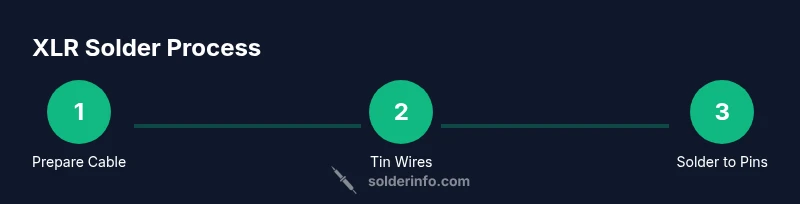
Start with a clean, dry workspace. Uncoil the cable, remove the outer jacket to reveal the shield, and trim back the shielding to expose the conductors. For xlr solder, you will usually work with three primary conductors: live (hot), neutral (ground), and shield. Slide heat-shrink sleeves over the cable before soldering to ensure you can easily slide them into place after the joints are made.
Inspect the XLR connector’s pins and sockets for any corrosion or debris. If needed, wipe them gently with isopropyl alcohol and allow to dry. With the correct pin mapping in mind (ground on pin 1, hot on pin 2, cold on pin 3 for many standard configurations), you’ll keep your xlr solder joints consistent and easy to test later. Plan your wire lengths so there’s a little slack to avoid strain on the joints.
Wire Stripping, Tinning, and Pin Mapping for XLR
Strip each conductor's insulation just enough to expose a clean copper section without nicking or fraying. Twist the strands lightly to minimize stray fibers and ensure a tight contact with the pin terminal. Tin each stripped end by applying a thin layer of solder; this helps the eventual joint wet evenly and reduces the risk of cold joints during the pin-to-wire connection. For xlr solder, consistent tinning on all conductors ensures uniform heat transfer when you apply the final joint.
Pin mapping is critical: connect the shield/ground to pin 1, the hot to pin 2, and the return/ground to pin 3 (or the manufacturer’s recommended configuration). Use heat-resistant tools and a small, steady hand to position wires so they align precisely with the pin tabs. Poor alignment causes slippage, which can lead to intermittent connections or mechanical failure under use.
Soldering the Pins: Making Reliable XLR Joints
With the joints pre-tinned and wires positioned, apply the soldering iron to the pin contact and feed the molten solder into the joint. The goal is a clean, smooth fillet that fully covers the copper without excessive build-up that could cause shorts to adjacent pins. Maintain a steady, light touch and avoid prolonged heat contact to prevent insulation damage. If using rosin-core solder, the flux will facilitate wetting and help prevent oxidation during the joint formation.
Avoid common mistakes like cold joints or bridging between adjacent pins. After the joint forms, gently inspect the area for a shiny, uniform appearance. If the surface looks dull or cracked, rework the joint by reheating and applying a small amount of fresh solder. The reliability of xlr solder joints depends on clean metal-to-metal contact and consistent heat application.
Insulation, Strain Relief, and Final Assembly
Once all joints are soldered, slide the heat-shrink sleeves into position and shrink them with a controlled, even heat source to avoid scorching the insulation. Apply strain relief features near the connector shell to prevent cable movement from transferring torque to the solder joints. In xlr solder projects, robust strain relief is as important as a solid electrical connection because it prolongs cable life and reduces micro-movements in the joint that can lead to fatigue damage over time.
Carefully inspect the shield continuity and ensure there are no exposed copper strands outside the insulation. Any stray copper can cause shorts or magnetic interference, affecting audio performance. Clip away any loose fibers and re-check the solder joints under proper lighting. A thorough final inspection helps guarantee a long-lasting xlr solder installation.
Inspecting and Testing Your XLR Solder Joints
Testing is essential after xlr solder to confirm both continuity and insulation integrity. Use a multimeter to check the continuity from pin 1 through the shield to the chassis ground, and then verify that pins 2 and 3 show expected continuity paths without shorting to ground. If you have access to signal testing equipment, perform a basic audio test by connecting the plug to a compatible output and listening for hum or crackling, which indicates poor shielding or a weak connection.
Record or note any anomalies and rework the joints as needed. A good practice is to perform a quick tug on the cable near the connector to simulate handling; if the joints remain intact, your xlr solder work is robust. Regularly inspecting and reworking joints when you notice wear or corrosion will extend the life of your audio gear.
Maintenance, Safety, and Best Practices for Long-Term Reliability
Soldering XLR connectors requires mindful handling of hot equipment and exposed copper. Always unplug equipment before starting and work in a well-ventilated area to manage flux fumes. Store rosin-core solder and flux in a cool, dry place to maintain their effectiveness for xlr solder projects. When not in use, tidy your workspace to prevent stray strands from falling into electronics and creating shorts. For hobbyists, developing a consistent workflow around xlr solder helps produce repeatable, reliable results and reduces anxiety when performing live repairs.
Quick Recap: Key Principles for Successful XLR Soldering
- Prepare properly: clean work area, shielded cable, clean connector.
- Tin wires and pins to ensure clean wetting during xlr solder.
- Maintain steady heat, avoid bridging, and ensure strain relief.
- Inspect joints visually and with a multimeter for reliability.
- Use heat-shrink and proper enclosure to protect connections during transport.
Tools & Materials
- Soldering iron (25-40W, fine tip)(Tip size suitable for small electronics work (0.5–1.0 mm).)
- Rosin-core solder (60/40 or lead-free)(0.6–1.0 mm diameter; rosin core preferred for flow.)
- Flux pen or flux paste(Electronics-grade flux for oxide removal.)
- Wire strippers(Small precision stripper; 22–24 AWG for most audio cables.)
- Heat-shrink tubing(Different diameters; pre-shrink sizes for strain relief.)
- XLR connector and shielded audio cable(Ensure proper gauge and shielding.)
- Heat source for shrinking tubing (hot air rework station or lighter)(Use with care to avoid insulation damage.)
- Multimeter (continuity tester)(Verify pins 1-2-3 continuity and absence of shorts.)
- Solder wick(For cleanup and bridge removal if needed.)
- Helping hand / magnifier(Stabilizes tiny components during xlr solder.)
- Alcohol wipes or isopropyl alcohol(Clean surfaces before tinning.)
Steps
Estimated time: 40-60 minutes
- 1
Power down and prep workspace
Ensure all equipment is unplugged and the work area is clear of clutter. Gather your xlr solder tools and materials and set them within easy reach. A calm, organized station reduces heat mistakes and accidental slips near sensitive connectors.
Tip: Lay a heat-resistant mat and have a small timer to pace delicate heating during soldering. - 2
Select cable and prepare the shield
Choose a shielded audio cable appropriate for XLR connections. Remove the outer jacket to expose the shield and conductors. Keep the shield intact until you’re ready to attach it to the shell ground, ensuring minimal oxidation at contact surfaces.
Tip: Keep shielding intact and use a gentle twist to prevent fraying. - 3
Strip insulation and tin conductors
Carefully strip the insulation on each conductor just enough to expose copper. Twist and tin the exposed wire ends with a neat, shiny layer of solder. Tinning helps the final joint form quickly and avoids cold joints.
Tip: Avoid nicking strands; damaged copper impedes solder flow. - 4
Map pins and position wires
Map the shield to pin 1 and the signal wires to pins 2 and 3 according to the standard XLR pinout. Position the wires so they align with the corresponding pin tabs. Use a helping hand if needed to keep everything steady.
Tip: Verify the pinout with the connector’s datasheet before soldering. - 5
Apply flux and prepare the joint
Before soldering, apply a thin layer of flux to the pin contacts. Flux improves wetting and reduces oxidation, which is crucial for a reliable xlr solder joint. Re-check alignment and ensure each wire is properly tinned.
Tip: A light flux application is enough; excess flux can attract debris over time. - 6
Solder the pins
Touch the soldering iron to the pin contact and feed solder into the joint. Stop once the joint is a smooth, even fillet that fully covers the copper without excess buildup. Let the joint cool without movement to prevent micro-movements that cause cracks.
Tip: Use a steady hand and a brief, controlled heat cycle for each pin. - 7
Inspect joints and fix bridges
Visually inspect each joint for a shiny, uniform surface. Look for bridges between adjacent pins and rework any suspicious joints. If needed, reflow with a small amount of fresh solder to restore integrity.
Tip: A bright light helps reveal dull or misshapen joints early. - 8
Apply heat-shrink and assemble housing
Slide heat-shrink tubing over the joints and carefully apply heat to shrink evenly. Add strain relief near the connector shell to prevent bending forces from stressing the joints during use. Assemble the XLR housing and verify fitment.
Tip: Shrink gradually to avoid overheating insulation. - 9
Test continuity and function
Use a multimeter to check continuity from pins to the expected circuit path and ensure no shorts between pins. If possible, test with audio equipment to confirm signal integrity and shielding effectiveness. Document any rework for future reference.
Tip: Test at both ends of the cable to catch issues early.
Quick Answers
What wire gauge is best for XLR solder connections?
Typically 22–24 AWG shielded audio cable works well for XLR soldering, offering a balance of flexibility and low resistance. Thicker wires can be harder to solder cleanly, while thinner wires may break easily under strain.
For XLR soldering, use 22 to 24 gauge shielded audio cable for best results. It’s a good balance between durability and ease of soldering.
Do I need heat shrink for XLR soldering?
Yes. Heat shrink provides strain relief and insulation for each solder joint, protecting against movement that could fatigue the joint. It also helps keep the overall assembly tidy and durable.
Yes, use heat shrink to protect joints and provide strain relief after soldering.
Is lead-free solder suitable for XLR soldering?
Lead-free solder is widely used and acceptable for XLR soldering, but you may need slightly higher heat or flux to achieve perfect wetting. If you choose leaded solder, be mindful of safety and disposal.
Lead-free solder works for XLR soldering; just adjust heat and flux as needed.
Why is my XLR joint cold and how do I fix it?
A cold joint occurs when the solder did not properly fuse with the conductor or pin. Reheat the joint gently, apply a small amount of fresh solder, and ensure the joint remains undisturbed while cooling.
A cold joint needs reflow with gentle heat and fresh solder to ensure a solid connection.
What flux should I use for XLR soldering?
Use electronics-grade rosin flux or flux designed for soldering delicate electronics. Flux helps with wetting and prevents oxidation during the joint formation.
Use electronics-grade rosin flux to improve wetting and protect joints.
How can I test XLR solder joints effectively?
Check continuity with a multimeter and verify the audio path with a simple signal test. Look for shorts between pins and confirm shield continuity for proper noise rejection.
Test continuity and shield integrity to confirm a solid XLR solder.
Watch Video
Top Takeaways
- Prepare a clean workspace and plan pin mapping before soldering.
- Tin conductors and pins for reliable wetting during xlr solder.
- Use proper strain relief to protect joints during handling.
- Inspect joints thoroughly and test continuity to validate success.
- Choose appropriate solder and flux to match lead-free or leaded preferences.