Solder Not Sticking to Pad: Troubleshooting Guide
Learn why solder not sticking to pad happens and how to fix it fast with a proven, step-by-step workflow, safety tips, and prevention strategies.


Most often, the pad won’t wet due to oxide, old flux, or insufficient heat transfer. If the pad is not sticking, start by cleaning the surface with isopropyl alcohol, re-applying fresh flux, and lightly tinning the pad and lead before re-soldering. Ensure the iron tip is clean, at the right temperature, and make solid contact for a steady wetting action.
Why solder not sticking to pad happens
Wetting is the heart of a strong solder joint. When solder does not wet the pad, you see a dull, blob-like fillet rather than a smooth, continuous bond. According to SolderInfo, the most common reasons are oxide on the copper surface, oils or residues from handling, and inadequate heat transfer from the iron. In dense boards or fine-pitch work, tiny particles can block wetting. Temperature, flux choice, and tip condition all play a role. If you notice the solder wets the component lead but not the pad, the pad surface is the bottleneck. Pad damage or lifted copper can also prevent adhesion. Start with cleanliness and a solid tool setup, then follow a systematic flow to avoid rework and keep solder not sticking to pad from becoming a recurring problem.
Common causes and how to spot them
Poor wetting usually boils down to a few predictable culprits: oxide on the pad, invisible contaminants from fingerprints, and stale flux that hasn’t been reformulated for modern rosin cores. You may also have insufficient heat transfer from a dulled tip or poor contact between the iron and pad. When a pad is contaminated, you’ll see poor fillet shape or delayed wetting even with a hot iron. If flux is expired or incompatible with the solder alloy, wetting degrades quickly. Finally, if pads are damaged or lifted, solder will refuse to form a bond. Systematic checks—surface cleanliness, fresh flux, proper tip, and visual pad inspection—solve most cases of solder not sticking to pad.
Essential prep: flux, cleaner, and pad condition
Preparation is critical to adhesion. Start by cleaning the pad with isopropyl alcohol and a lint-free swab to remove oils and residues. If you detect oxidation, gently rub the pad with a fine abrasive sponge or brass brush designed for electronics, then re-clean. Apply a fresh, compatible flux and let it thoroughly wet the pad before attempting to solder. Consider pre-tinning the pad or copper trace to improve initial wetting. Keep the surrounding components shielded from flux splash, and avoid touching pads with bare fingers to prevent oils from transferring. All these steps reduce surface tension and improve solder not sticking to pad prevention in future projects.
Proper soldering technique to improve wetting
Wetting quality hinges on consistent heat transfer and clean surfaces. Hold the iron tip at a stable temperature and make sure it is properly tinned. Apply flux first, then place the lead or component against the pad; bring the solder to the joint, not the iron, and remove heat once the pad is wetted. If you’re seeing bridging or incomplete fillets, re-tin the pad and lead and try again with a slower, steadier motion. Avoid pressing hard—let capillary action do the work. For fine-pitch jobs, use a fine-tipped iron and a flux pen to control the wetted area, which minimizes the risk of solder not sticking to pad.
,
Common failure modes and fixes
A common failure is a dull, non-wetting pad surface. The cure is targeted cleaning and fresh flux, followed by re-tinning. Another frequent issue is a dirty or oxidized iron tip that can’t transfer heat effectively; in this case, clean and re-tin the tip, or replace it if needed. If flux is old, replace with a fresh rosin-based flux and rework the joint. On boards with lifted copper or damaged pads, repair may be necessary—bridge with copper foil or use a via patch, or replace the PCB if feasible. Learning to distinguish between wetting failure due to surface contamination versus mechanical pad damage makes solder not sticking to pad a solvable problem in most hobbyist setups.
When to replace pads or PCB and professional help
If pads are visibly lifted, buried under flux residues that won’t clear, or you notice recurring open circuits after multiple attempts, it’s time to consider pad repair or PCB replacement. Complex boards or through-hole pads that are damaged require professional rework. For critical electronics, especially in hobby projects that require reliability, consult a skilled tech or PCB service if you cannot achieve a clean solder joint after multiple iterations. Early intervention saves time and ensures safety during future projects.
Quick maintenance routine to prevent future issues
Preventive care includes cleaning pads after each session, storing flux properly, and keeping your tools in good condition. Regularly inspect tips for wear, replace dull tips, and keep a small supply of fresh flux and IPA. Establish a testing routine on a scrap board to verify wetting before tackling a real project. With consistent maintenance, solder not sticking to pad becomes a rare problem rather than a recurring obstacle.
Safety and best practices
Always work in a well-ventilated area and wear eye protection. Flux fumes and hot solder can cause irritation. Use an ESD-safe mat and grounded tools to prevent damage to sensitive components. Never rush heat application; premature cool-down can cause cold joints and worsen adhesion issues. If you’re unsure, seek professional guidance rather than risking damaged boards or personal injury.
Troubleshooting flow at a glance
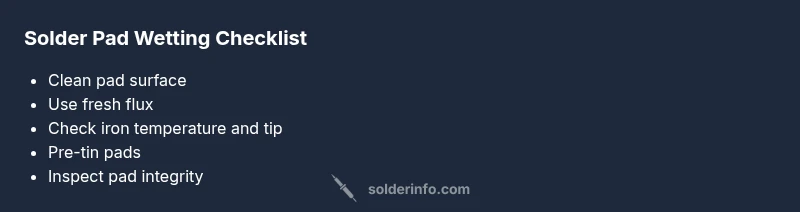
Follow a flowchart: clean surface → fresh flux → verify heat and tip → re-tin → rework joint → inspect pad for damage → decide if professional repair is needed. This repeatable process minimizes guesswork and reduces the chance of missing a root cause when solder not sticking to pad.
Steps
Estimated time: 25-40 minutes
- 1
Power off and prep workspace
Power down the device and unplug the work area. Ground yourself and clean the workspace. Inspect the pad for obvious damage before you begin. Having a safe, clean setup reduces the risk of contamination that causes solder not sticking to pad.
Tip: ESD-safe measures protect delicate components and pads. - 2
Clean and inspect the pad
Wipe the pad with isopropyl alcohol to remove oils. If you see dull areas, lightly abrade with a non-metallic pad or specialized electronics brush, then wipe again and let dry.
Tip: Do not scrub too hard; you can remove copper if you overdo it. - 3
Apply fresh flux and re-tin
Apply a thin layer of flux to the pad and tin the pad lightly with solder. The goal is to create a wetted surface that will readily accept the component lead. Avoid globbing flux that can attract debris.
Tip: A flux pen gives controlled, precise application. - 4
Check the iron and tip condition
Ensure the iron tip is clean and properly tinned. If the tip is worn or oxidized, replace or re-tin before continuing. Use a stable, comfortable stance and place the joint correctly to improve heat transfer.
Tip: A steady hand and correct tip geometry dramatically improve wetting. - 5
Re-solder the joint
Place the component lead on the pad and touch the pad with solder so it flows and forms a smooth fillet. Remove heat as soon as the joint wets; avoid moving the lead until the joint solidifies.
Tip: Keep the iron in contact briefly to avoid cold joints. - 6
Inspect and test
Look for a shiny, smooth fillet with good adhesion. Gently wiggle the component to ensure a solid joint. If dampness or gaps remain, repeat cleaning and tinning steps before trying again.
Tip: Small test on a scrap board helps avoid mistakes on the real board.
Diagnosis: Pad won't wet during soldering
Possible Causes
- highPad oxidation or contaminated surface
- mediumExpired or incompatible flux
- highInadequate heat transfer due to dull tip or improper temperature
- lowPad damage or lifted copper
Fixes
- easyClean pad with isopropyl alcohol and lint-free swab to remove oils and residues
- easyGently remove oxide with a fiberglass pen or brass scrub pad, then re-clean
- easyApply fresh flux and pre-tin the pad or copper trace before re-soldering
- easyEnsure proper heat transfer by cleaning and regrounding the tip; avoid excessive pressure
- mediumInspect for pad damage; repair with copper patch or board replacement if necessary
Quick Answers
Why does solder not stick to a pad even when I apply flux?
Flux quality and application matter. If flux is old or not suitable for the solder alloy, wetting can fail. Use fresh flux and apply it evenly to the pad before re-soldering.
Flux quality matters; refresh flux and rework the pad to improve wetting.
How can I tell if the pad is oxidized or contaminated?
A dull, matte pad surface or residue around the pad indicates oxidation or contamination. Cleaning with isopropyl alcohol and a gentle brush usually reveals a brighter copper surface.
Look for a dull surface and clean to reveal bright copper.
Is lead-free solder harder to get to stick to pads?
Lead-free solder requires good wetting and careful control of heat. Ensure flux compatibility and a clean tip, then use a slightly longer wetting time without overheating the joint.
Lead-free needs proper heat and clean surfaces for good wetting.
What should I do if the pad is damaged or lifted?
For lifted pads, you may need circuit patching or PCB repair. If the joint is critical, consult a professional repair service to avoid further damage.
Damaged pads often need professional repair or PCB patching.
Can I still solder with a dirty or oxidized tip?
No, a dirty tip reduces heat transfer and hinders wetting. Clean and tin the tip before continuing, or replace it if worn.
A clean, well-tinned tip is essential for good wetting.
When is it safe to rework a pad instead of replacing the board?
If the pad damage is minor and repairable without risking traces or vias, rework may be feasible. For critical boards, seek professional help.
Rework is possible for minor damage; consult a professional for critical boards.
Top Takeaways
- Clean the pad and use fresh flux before soldering
- Ensure your iron and tip are clean and properly heated
- Pre-tin pads to improve initial wetting
- Inspect pads for damage; repair early to prevent failures