How to Tell If a Soldering Iron Tip Is Bad
Learn to identify a worn or contaminated soldering iron tip and fix common issues quickly with proven troubleshooting steps for electronics, jewelry, and plumbing soldering. This guide covers signs, cleaning best practices, replacement decisions, and prevention tips.


Most soldering iron tips go bad when they corrode, oxidize, or accumulate burnt flux, which reduces heat transfer and causes cold joints. A quick check is to scrub the tip with a brass sponge, re-tin with fresh solder, and inspect for pitting or warping. If the tip remains dull after cleaning and tinning, replace it.
Why a Soldering Tip Degrades
Soldering tips are built around a copper core coated with iron to resist erosion and maintain sharp heat transfer. The protective plating is thin and can fail under heat cycling, aggressive cleaning, moisture, and exposure to aggressive flux. When the iron plating wears, the tip loses its ability to heat evenly, and hot spots form, accelerating oxidation and flux burn. Over time, oxidation forms a stubborn film that shields the copper from heat, which means you may need more power or longer contact times, increasing the risk of burnt joints, poor adhesion, and component damage. In jewelry and electronics, this is especially risky because delicate components can be damaged by overheated or oxidized tips. To slow degradation, practice consistent cleaning, use the right tip size for the job, avoid excessive temperatures, and store tips in a closed container to minimize moisture. When a tip becomes pitted, warped, or shows visible copper beneath damaged plating, replacement is the most reliable remedy.
Signs Your Tip Is Worn or Contaminated
Look for a dull, gray, or orange-brown surface that won't take solder cleanly. If solder beads on the tip rather than wetting, or if joints look dry and crumbly, heat transfer has declined. Oxidation is often the first clue: a crusty film that forms quickly after cleaning or after a hot job. Warping or visible pitting also signals the coating is past its prime. You may notice increased spatter or solder balls forming away from the joint, a symptom of poor heat, or inconsistent temperature along the tip. In high-precision work (electronics or jewelry), even small oxidation can ruin a joint and require rework. When in doubt, test the tip on a scrap piece of copper or brass with fresh flux; if the solder refuses to flow, the tip is likely bad and needs cleaning or replacement.
Quick Home Checks You Can Do
- Visually inspect the tip for discoloration, corrosion, or pitting.
- Clean the tip with a brass sponge or copper cleaner; never use steel wool.
- Re-tin the tip with fresh solder, ensuring a thin, even coat.
- Check heat response by attempting a small joint and watching for smooth flow.
- If solder still flows poorly, replace the tip or the entire iron if the heater is weak.
- Store tips dry and in a tip stand to prevent moisture exposure.
Reconditioning vs Replacement: How to Decide
If the tip still shows a clean copper core with intact iron plating and you can regain a bright soldering surface after cleaning and tinning, try reconditioning first. Light oxidation can be removed with a tip cleaner and proper tinning. However, if you see deep pitting, significant plating loss, warped geometry, or persistent dullness after multiple clean-and-tin cycles, replacement is the safer option. When in doubt, perform a quick test on a scrap joint; a clean, well-wetted joint is evidence that the tip is still serviceable. Remember that a bad tip can damage sensitive components and lead to unreliable connections across electronics, jewelry, and plumbing projects.
How Oxidation Affects Heat Transfer
Oxidation creates a barrier between the iron plating and the solder. This barrier increases thermal resistance, meaning your iron must work harder to reach the target temperature, which can cause heat spikes, overheating, and flux burn. As heat transfer worsens, joints lose wetting quality, causing cold joints and poor adhesion. Regular cleaning, timely tinning, and avoiding excessive heat help maintain a crisp, even contact surface. When oxidation becomes thick or crusty, the only reliable remedy is replacing the tip with a fresh one that can conduct heat efficiently.
Environmental and Usage Factors
Humidity, corrosive flux, and improper storage accelerate tip degradation. Leaving tips in hot cleaners or flux residues can corrode the coating and thin the protective plating. Using the incorrect tip for a specific task—such as a small bevel tip for large ground pads—forces the iron to work harder, increasing wear. Temperature mismanagement also matters; running a tip much hotter than its design spec accelerates oxidation and plating wear. To minimize risk, store tips in a dry, dust-free environment, select the right tip geometry, and perform routine maintenance at the end of each session.
Preventive Practices for Long-Term Tip Health
A proactive maintenance routine saves time and money. Clean tips immediately after use, re-tin while hot, and store in a tip stand. Use flux appropriate for the material, avoid excessive temperatures, and replace tips showing signs of wear before they affect joints. Calibrate your iron or adjust the power setting to match the tip size and material. A simple routine—inspection, cleaning, tinning, and storage—every session dramatically extends tip life and reduces rework.
Steps
Estimated time: 60-90 minutes
- 1
Power down and prep workspace
Unplug the iron and let it cool before handling. Wear safety glasses and work in a well-ventilated area. Gather cleaning tools and replacement tips.
Tip: Always unplug before inspecting or cleaning to prevent burns. - 2
Inspect the tip visually
Look for discoloration, pitting, or visible copper showing through the plating. Note any warping or bent geometry that could affect heat transfer.
Tip: A quick visual pass saves time before deeper cleaning. - 3
Clean the tip surface
Gently brush the tip with a brass sponge or copper cleaner to remove oxidation and flux residues. Avoid rough abrasives that can scratch plating.
Tip: Clean in a single, even motion to avoid gouges. - 4
Re-tin the tip
Apply a thin, even coat of fresh solder while the tip is warm. Ensure the solder wets the surface evenly and forms a bright, shiny layer.
Tip: Don’t apply excess solder; a thin coat protects the tip during future use. - 5
Test on scrap and assess heat transfer
Flux a scrap piece and attempt a small joint. If solder beads or won’t wet, the tip isn’t performing well enough.
Tip: A successful wetting on scrap is a good sign for next steps. - 6
Decide between reconditioning or replacement
If oxidation is mild and cleaning/tinning restores performance, continue using with caution. If plating is worn or copper is exposed, replace the tip.
Tip: When in doubt, err on the side of replacement to protect components. - 7
Store and document upkeep
Dry storage and a quick maintenance log help prevent future degradation. Revisit tip condition at the next project start.
Tip: Consistent storage protects against moisture-related corrosion.
Diagnosis: Tip shows poor heat transfer or metals appear oxidized and joints are not wetting properly
Possible Causes
- highOxidation and flux buildup on the tip
- mediumWorn or damaged iron plating exposing copper
- lowIncorrect tip size for the work or overheating
Fixes
- easyClean the tip with a brass sponge and re-tin with fresh solder
- easyReplace the tip if plating is worn or copper is exposed
- easyVerify heater power and tip size; adjust temperature if needed
Quick Answers
What are the most common signs a soldering iron tip is bad?
Common signs include oxidation, dull or pitted surfaces, poor wetting of solder, and inconsistent heating leading to cold joints. If cleaning and tinning don’t restore performance, the tip is likely worn.
Look for oxidation and dullness; if cleaning helps only briefly, you should replace the tip.
Can cleaning revive a corroded tip?
Cleaning can restore some conductivity by removing surface oxide, but persistent corrosion or plating wear usually requires replacement.
Cleaning helps, but if corrosion is stubborn, replace the tip.
How often should I replace a tip?
Replacement depends on use and care. Inspect tip regularly and replace when you see pitting, flaking plating, or heat loss.
Check the tip regularly for wear and replace when you see damage.
Is tinning necessary after cleaning?
Tinning restores the surface and helps prevent immediate re-oxidation. Re-tin before resume work.
Yes—re-tin after cleaning to protect the tip.
What’s the best way to extend tip life?
Maintain proper temperature, clean frequently with the right tools, and store tips dry and re-tinned.
Use proper temperature and regular cleaning to extend life.
When should I seek professional repair?
If you suspect internal heater damage or uneven heating that you cannot fix, seek professional service.
If you suspect heater damage, consider professional service.
Watch Video
Top Takeaways
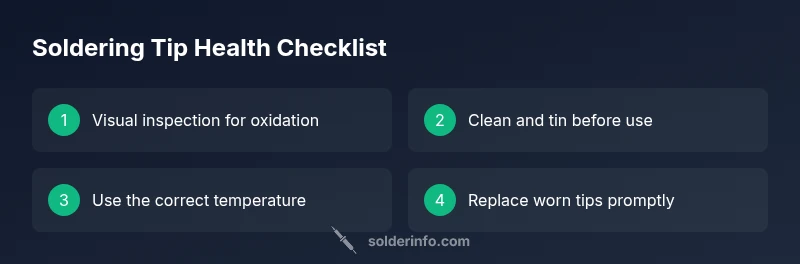
- Inspect tip surfaces regularly
- Clean and tin to restore conductivity
- Replace worn tips promptly to prevent damage
- Use correct temperature for tip material