Is It OK to Solder Speaker Wire? A Practical Guide
Learn safe, reliable methods for soldering speaker wire, including tinning, insulation, strain relief, and testing to ensure strong, clean audio connections.


According to SolderInfo, you can solder speaker wire safely when you follow proper technique. The key is to control heat, use the right solder and flux, and provide solid insulation and strain relief. This quick answer covers the essential steps and common mistakes, so you can upgrade or repair speaker connections without risking damage to the audio path or equipment.
Is It OK to Solder Speaker Wire? Why this matters in audio quality
If you're asking is it ok to solder speaker wire, the answer is generally yes for most hobbyist and professional setups. When done correctly, solder joints can be durable, conductive, and resistant to vibration. The downside is that heat from the iron can damage insulation or nearby components if you rush or apply too much heat. According to SolderInfo, choosing the right materials and controlling heat are foundational to a reliable joint. In DIY audio projects, good soldering practice preserves signal integrity and reduces the chance of intermittent connections, which can manifest as crackling or dropouts. Keep your workspace clean, your tools sharp, and your timing deliberate to ensure a clean, long-lasting connection.
Understanding Wire Types and Termination for Audio
Speaker wire comes in several forms, with stranded and solid copper being the most common. Stranded wire is more forgiving in tight spaces and flexible in run lengths, while solid wire can offer a slightly lower resistance path in short runs. For most DIY speaker installations, stranded wire paired with a robust termination method (such as properly crimped or soldered connections) provides a reliable balance of ease and performance. The termination method matters because a loose or poorly terminated joint can introduce resistance, noise, or intermittent contact. When deciding whether to solder, crimp, or clamp, consider the wire gauge, the environment, and whether the connection will be frequently flexed—these factors affect long-term reliability.
Flux, Solder, and Temperature: Getting the Chemistry Right
Using the right flux and solder is essential for clean, consistent joints on speaker wires. Rosin-core solder is commonly recommended for electronics work because it improves wetting on copper strands and helps prevent oxidation during heating. Lead-free options are preferred in many hobby and professional settings for safety and compliance. The heat you apply should be enough to wet the copper but not so high that insulation or nearby components are damaged. A gentle, steady touch with the iron usually yields better joints than fast, aggressive heat. Bond strength depends on clean copper surfaces, proper tinning, and sound mechanical grip of the joint.
Tools and Materials You’ll Need Before You Start
Before you even plug in the iron, gather the basics: a suitable soldering iron, rosin-core solder, flux if using non-rosin core, heat shrink tubing, a wire stripper, and good lighting. A multimeter can help verify continuity after soldering. Keep safety glasses handy and work in a well-ventilated area. This preparation reduces the risk of cold joints, stray strands, and heat-related insulation damage. Soldering speaker wire is a precise task, but with the right setup you’ll assemble strong, lasting connections that withstand vibration and movement.
Step-by-Step Technique Overview: Prep, Tin, Join, Seal
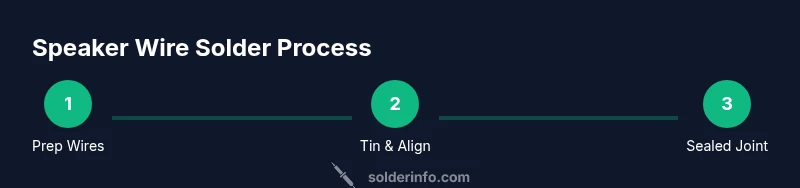
The actual soldering sequence matters as much as the joint itself. Start with clean copper and properly trimmed insulation. Tin both conductors lightly to improve wetting, then align them so the copper surfaces mate cleanly. Apply heat evenly and introduce solder until a smooth, shiny joint forms without excess extrusion. Finally, cover the joint with heat-shrink tubing and let it cool slowly to avoid any micro-cracks. This sequence minimizes resistance, oxidation, and mechanical strain on the wire.
Common Pitfalls and How to Avoid Them
Common mistakes include overheating the insulation, using too much solder, or neglecting strain relief. Overheating can soften plastic and degrade jacket integrity. Too much solder can create blobs that impede flex or create short circuits if the conductive surfaces touch. A lack of strain relief makes the joint vulnerable to flexing, which can fatigue the copper and lead to failure. To avoid these issues, keep heat at a controlled level, apply only what you need, and secure the wire so it cannot move at the joint.
Testing and Validating Your Solder Joints
After soldering, verify the connection with a simple resistance test and a gentle tug test to ensure the joint remains solid under typical movement. Use a multimeter to check for continuity across the joint and a very low resistance that indicates a good bond. Listen for crackling or intermittent connections during a quick audio test, which can indicate a hidden cold joint or poor insulation. Rework any suspect joints with fresh tin and a clean surface.
Safety Practices and Best Practices for Home and Studio
Always work in a ventilated area and wear safety glasses to protect against splashes. Keep your flame-free workspace free of flammable materials and never touch the hot tip to skin. Remember that insulation integrity is crucial; damaged jackets may expose copper and cause short circuits. When in doubt, re-strip the wire and re-tin to restore a clean, reliable surface. These practices improve both safety and performance in every soldering task.
Verdict: Practical Recommendations from SolderInfo
Based on SolderInfo analysis, soldering speaker wire is a valid and reliable method when done with proper technique and materials. The most important factors are maintaining control of heat, ensuring clean copper surfaces, and providing effective insulation and strain relief. With careful preparation, solder joints can deliver stable electrical paths and robust mechanical strength for speakers in home audio setups or professional environments. The SolderInfo team recommends building a repeatable process that prioritizes cleanliness, low heat, and thorough testing to achieve consistent results.
Tools & Materials
- Soldering iron(20–40W, fine tip preferred)
- Rosin-core solder(Lead-free preferred for safety)
- Flux (optional)(Use if flux-core solder is not used)
- Heat shrink tubing(Sizes that fit your wire gauge)
- Wire stripper(Strips insulation without nicking copper)
- Wire cutter(Clean cut for neat joints)
- Multimeter (continuity tester)(Verify clean connections)
- Electrical tape or adhesive-lined heat-shrink(Extra insulation and strain relief)
Steps
Estimated time: 30-60 minutes
- 1
Prepare the workspace and wires
Set up a clean, well-lit work area with good ventilation. Cut wires to the desired length and inspect for nicks or frayed strands. If you have any damaged jacket sections, trim and re-strip before proceeding.
Tip: Secure the wire so it cannot move during soldering to reduce fatigue on the joint. - 2
Strip insulation and expose copper
Use a precision wire stripper to remove insulation from each conductor, revealing enough copper for a neat tinning and joint. Avoid nicking or breaking strands; even a few damaged strands can weaken the connection.
Tip: Expose only what you need; excess exposed copper can cause shorts. - 3
Tin both conductors
Apply a small amount of solder to each exposed conductor. Tinning helps improve wetting and makes the final bond stronger and more uniform. Do this quickly to avoid overheating the conductor.
Tip: Keep the tip clean and evenly heated to prevent cold joints. - 4
Align and join the conductors
Position the tinned ends so they touch evenly, ensuring the copper surfaces meet cleanly. If using a twist, twist gently to secure the conductors before applying heat. Start with one conductor at a time if needed.
Tip: Avoid twisting too hard; a gentle hold reduces strand fatigue. - 5
Apply solder and form a smooth joint
Heat the joint with the iron and feed solder until the joint is fully wetted and smooth. Remove heat as soon as the joint wets; avoid creating blobs that can flex and crack over time.
Tip: Aim for a shiny, concave fillet rather than a dull blob. - 6
Inspect the joint and trim excess
Check for clean solder flow, no cold spots, and no stray strands. Trim any frayed strands and re-tin if needed. If the joint looks dull or fractured, rework it.
Tip: A good joint should be visible as a clean, even collar around the copper. - 7
Insulate and shield the joint
Slide heat shrink tubing over the joint and center it. Apply heat evenly to shrink the tubing around the joint, providing insulation and strain relief. If necessary, add a second layer for extra protection.
Tip: Use a heat gun or lighter with caution to avoid overheating the insulation. - 8
Test continuity and finalize
With insulation in place, test the circuit for continuity and resistance. A quick audio test in a controlled environment can confirm a stable connection. If anything seems off, reassess the joint and rework as needed.
Tip: Document the setup for future maintenance and repairs. - 9
Document and plan for strain relief
Plan for strain relief at the speaker terminal; mount or secure the wire to prevent movement. Strain relief reduces the risk of fatigue and breakage at the joint over time.
Tip: Use cable clamps or adhesive backings for reliable support.
Quick Answers
Is it better to solder or crimp speaker wires for a speaker terminal?
Both methods are common and valid. Soldering can provide a solid electrical connection and good long-term reliability when done properly, while crimping is faster and can be very reliable if you use the right connectors and technique. Consider the environment, vibration, and accessibility when choosing.
Soldering and crimping both work; pick the method that fits your project and use correct technique for reliability.
What solder type is best for speaker wire?
Choose a rosin-core solder suitable for electronics; lead-free options are common today for safety and compliance. Avoid solders with excessive flux that can leave residue on the terminal surfaces.
Use rosin-core solder, with lead-free options often preferred for safety.
Can soldering speaker wire damage the speaker terminals?
Damage is possible if heat is applied too long or too close to the terminal. Keep heat brief, avoid overheating insulation, and secure the wire so movement doesn’t stress the joint.
Yes, excessive heat or careless handling can harm terminals; keep heat controlled.
Do I need to remove all insulation before tinning?
Expose enough copper to properly tin but avoid removing more than necessary. Avoid nicking strands; damaged strands weaken the joint.
Expose enough copper to tin without damaging strands.
Is soldering speaker wire suitable for professional audio installations?
Soldering can be used in professional contexts for certain runs and connections, especially where strain relief and clean joints are critical. In many installations, connectors and terminal blocks offer robust, repeatable performance.
Yes, but evaluate installation requirements and repeatability needs.
What safety precautions should I follow?
Work in a ventilated area, wear eye protection, and keep flammable materials away from the work surface. Allow joints to cool before handling, and keep hot tools away from skin.
Ventilate, protect your eyes, and handle hot tools safely.
How do I test for continuity after soldering?
Use a multimeter to check continuity across the joint and ensure resistance is low. If the reading is inconsistent, rework the joint and re-test.
Check continuity with a multimeter and re-test if needed.
Are stranded wires harder to solder than solid wires?
Stranded wires can be trickier due to fraying strands, but they’re more flexible for most speaker installations. Keep the strands intact, tin evenly, and avoid shredding insulation to maintain surface area.
Stranded wires take care to tin evenly and avoid fraying.
Watch Video
Top Takeaways
- Use proper tinning for reliable joints
- Control heat to protect insulation and components
- Provide strain relief and proper insulation
- Test joints for continuity and sound quality
- Document setup for easier maintenance