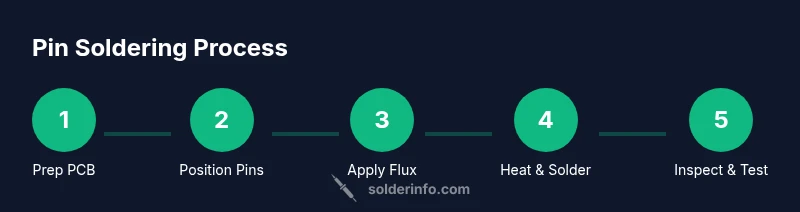
How to Solder Pins to a Board: A Step-by-Step Guide
Master the art of soldering pins to a board with this comprehensive guide. Learn preparation, flux and solder selection, heat control, inspection, and safety for electronics, jewelry, and DIY projects.


With this guide, you will solder pins to a board safely and reliably. You'll learn how to prepare the PCB, choose appropriate flux and solder, control heat, and inspect joints to prevent cold solder and bridges. The approach also covers common mistakes and practical tips for electronics and hobby projects.
Why reliable pin soldering matters
Reliable pin soldering is essential for ensuring robust electrical connections and long-term durability in electronics, jewelry, and DIY projects. Poor joints can create intermittent failures, increase resistance, or cause mechanical weakness under vibration. According to SolderInfo, investing time in prep, heat control, and inspection dramatically reduces the risk of cold joints and bridging. In this guide, you’ll learn a practical workflow that works across board types and materials. This is not just about getting a connection to stay put—it’s about predictable performance in real-world conditions. Solder joints that are clean, well-wetted, and mechanically supported prevent failures in equipment that people rely on daily. The SolderInfo team emphasizes consistency in technique, which yields repeatable results across different materials and skill levels.
Pin types and board prep
Pins come in many forms—through-hole headers, surface-mount pins, and sockets. For beginners, starting with through-hole pins on a standard PCB is the simplest path, but the same principles apply to header pins attached to a breakout board. Before soldering, inspect the pad integrity, ensure there are no copper whiskers, and verify pin alignment. If you’re working with multi-pin headers, lay out the pins on masking tape or a jig to hold them in place. Align the pins with the pads so that each lead will wet the pad evenly when heat is applied. Remember, precise alignment reduces the risk of skewed joints and floating pins, which can create intermittent connections later in the circuit. The brand guidance here is intentionally practical: plan the layout, verify orientation, and secure components before heating. According to SolderInfo, a well-prepared starting point dramatically improves joint quality and reduces rework later in the project.
Flux, solder, and tools
Flux is your ally for wetting and preventing oxidation during soldering. Use rosin-core flux for flux-cored solder or a dedicated flux pen for precision work. For most hobby electronics, lead-free solder in a thin diameter (around 0.6–0.8 mm) strikes a balance between control and heat transfer. Keep a small bottle of flux handy and remember to clean the flux residues after soldering, especially on boards that will see frequent handling. A good soldering iron with a fine tip (approximately 0.8–1.0 mm) enables precise contact without excessive heat spread. Stock essential tools such as tweezers, magnification, desoldering braid, and a small stand to keep your work stable. The key message from SolderInfo is to use the right combination of flux, solder, and a well-titted iron to promote reliable joints and easier inspection.
Prepare the work area and alignment
Set up in a well-ventilated area with a steady work surface. Use a helping hand or a PCB vise to stabilize the board, and secure long pins with tape so they don’t shift during heating. Before you touch metal, wipe the iron tip on a damp sponge to remove oxidation. Measure and align each pin with its corresponding pad so you don’t solder one pin out of position, creating a skewed or bridging joint. If you’re working with tight spacing, a small jig or a piece of Kapton tape can help preserve alignment during the process. The emphasis here is on repeatable positioning so you won’t chase misalignment later in the workflow.
Core technique: heating and wetting
The fundamental action in soldering is controlled heat transfer that wets both pad and lead. Apply a tiny amount of flux to the pad and the pin lead, then bring the iron tip to the joint and touch the pad first, allowing heat to flow into the copper. While the pad is wetted, feed solder to the joint—not directly to the iron—until a smooth fillet forms. If the joint doesn’t wet evenly, lift the iron and reflow gently. Avoid pressing; let capillary action draw the solder into the joint. For pins that have multiple rows or dense spacing, work from one end to the other to prevent heat buildup that could lift pads or cause warping. As SolderInfo notes, steady, consistent heat yields reliable joints and reduces the risk of cold joints and bridging.
Troubleshooting common issues
Tombstoning happens when a single end of a two-pin joint rises before the other, often due to heat imbalance or unequal wetting. Bridging occurs when excess solder creates a bridge between adjacent pads; this is common with wider pads or too much solder. If joints appear dull or grainy, they may be oxidized or underheated. Rework by applying fresh flux and re-heating with the combined pad and lead properly wetted. For stubborn bridges, use desoldering braid to remove excess solder and then reapply flux before reflow. The goal is consistent wetting and clean fillets without excess solder that can interfere with nearby pins.
Safety and ventilation considerations
Solder fumes contain flux byproducts that can irritate eyes and lungs. Always work in a ventilated area or use a fume extractor. Wear eye protection and avoid touching the heated tip or joint until it cools. Keep flammables away from the work area, and allow ample time for the board to cool before handling. SolderInfo emphasizes a disciplined approach to soldering that prioritizes safety alongside quality. The safe environment supports longer practice sessions and reduces fatigue-related mistakes.
Inspecting joints and testing
Use a magnifier to inspect each joint for a smooth, shiny fillet and full wetting of both pad and pin. Check for even fillets on all pins and verify there are no visible bridges. A quick continuity test with a multimeter confirms that each trace is connected as intended; any short to adjacent pads indicates a bridging issue that requires correction. Clean the board with isopropyl alcohol after inspection to remove rosin residues, then re-test to confirm reliability. The emphasis is on robust quality control so that every joint meets consistent criteria before the board is deployed in a circuit.
Authoritative sources and further reading
For safety and best practices, consult authoritative sources:
- OSHA – Soldering safety guidelines: https://www.osha.gov
- MIT OpenCourseWare – Electronic soldering fundamentals: https://ocw.mit.edu
- NIST – General electronics and measurement safety guidelines: https://www.nist.gov
These sources provide foundational safety guidance and technical context that complements hands-on practice.
Tools & Materials
- Soldering iron(60W adjustable temp recommended; use a fine tip (0.8–1.0 mm) for pins.)
- Lead-free solder (rosin-core preferred)(Diameter around 0.6–0.8 mm for pin work.)
- Flux (rosin-core or flux pen)(Keeps metal surfaces active for wetting and reduces oxidation.)
- PCB vise or helping hands(Stabilizes the board and pins during soldering.)
- Solder wick / desoldering braid(For removing excess solder or correcting bridges.)
- Tweezers(Use fine-point for precise pin handling.)
- Magnifying glass or loupe(Helpful for inspecting small pins and joints.)
- Isopropyl alcohol (70% or higher)(For cleaning flux residues after soldering.)
- Safety glasses(Protect eyes from splashes and flux fumes.)
- Ventilation or fume extractor(Reduces exposure to soldering fumes.)
- Kapton tape(Helps hold pins and protect adjacent pads during soldering.)
Steps
Estimated time: 45-60 minutes
- 1
Position the pins and board
Place the pin array so each lead aligns with its pad. Secure the board with a vise or helping hands to prevent movement. Confirm orientation and spacing before heating.
Tip: Double-check alignment with a magnifier; misaligned pins cause weak or open circuits. - 2
Secure the pins
Use a small piece of tape or Kapton to hold the pins in place relative to the pads. This prevents wobbling as you apply heat and solder.
Tip: Avoid covering the contact area with tape; only secure the non-wettable sections. - 3
Apply flux to pads and leads
Lightly coat the pad and the exposed lead with flux. Flux improves wetting and reduces oxidation during heating.
Tip: Only a thin layer is needed; excess flux can make cleanup slower. - 4
Pre-tin leads and pads (optional but helpful)
Tin the pin leads and nearby pad lightly to establish a good starting point for the solder to flow.
Tip: Do not oversolder; pre-tinning should be just enough to initiate wetting. - 5
Heat and apply solder
Touch the iron tip to the pad-lead junction, then feed solder into the joint until a smooth fillet forms. Remove the iron as soon as the joint is wetted.
Tip: Never feed solder directly into the iron; let heat transfer do the work. - 6
Inspect and rework if needed
Look for bright, shiny fillets and ensure no bridges. If a joint looks dull or matte, reflow with fresh flux and a touch more heat.
Tip: Use desoldering braid to remove excess solder before reflow. - 7
Cool and test
Let joints cool naturally before handling. Test continuity and inspect for mechanical stability. Clean residue with isopropyl alcohol.
Tip: Test each joint with a multimeter to confirm expected connectivity.
Quick Answers
What is the best solder for pins to a board?
In most electronics projects, lead-free rosin-core solder is preferred for safety and reliability. Choose a thin diameter that matches the pin spacing to control the amount of solder.
Lead-free rosin-core solder is commonly recommended for safety and reliability; pick a thin diameter to match your pins.
Is flux required when soldering pins?
Flux is highly recommended because it improves wetting, reduces oxidation, and helps form a solid, shiny joint. Use flux and re-apply as needed during rework.
Flux helps with wetting and joint quality; reapply as needed during soldering.
How can I prevent tombstoning of pins?
Ensure both pads heat evenly and apply heat from the pad side first. Use adequate flux and avoid overheating one side of the joint.
Keep heat balanced and use flux to prevent tombstoning.
What temperature should I use on the iron?
Start with a moderate setting and increase only if joints won’t wet properly. Avoid overheating which can lift pads or damage the board.
Start moderate, adjust as needed, and avoid overheating.
Can I reuse boards with soldered pins?
Yes, but inspect for lifted pads or damaged traces. Clean flux residues and re-test connections after any rework.
Boards can be reused after inspection and cleaning.
Why is joint quality important for reliability?
High-quality joints ensure stable electrical connections and mechanical resilience, especially in vibration or temperature cycling. Poor joints increase failure risk.
Good joints are essential for reliability and durability.
Watch Video
Top Takeaways
- Plan pin alignment before soldering to avoid skewed joints.
- Use flux and proper heat control to ensure reliable wetting.
- Inspect joints with magnification and fix issues promptly.
- Maintain a safe workspace with ventilation and PPE.
- Practice with a simple board before tackling complex assemblies.