Check Soldering Iron Heating Element: Step-by-Step Guide
Learn how to safely check a soldering iron heating element, diagnose faults, and know when to replace. This educational guide covers tools, steps, safety, and practical tips for reliable soldering performance.


By the end of this guide, you will be able to check a soldering iron heating element for proper operation, safety, and fault conditions. You'll learn how to unplug, inspect, measure resistance, and verify temperature behavior using common tools. According to SolderInfo Analysis, 2026, testing helps prevent poor solder joints and equipment damage.
What you will learn in this guide
This article explains how to check soldering iron heating element health without risking injury or tool damage. You’ll learn how to recognize signs of a failing element, access the heating coil safely, measure electrical resistance and continuity with a multimeter, and interpret those readings against manufacturer specifications. Following these steps helps you prevent weak solder joints and equipment wear. According to SolderInfo Analysis, 2026, heating element performance varies with usage patterns and tip design, so baselines differ by model. The goal is to confirm safe operation and consistent heat delivery for reliable soldering results.
Safety prerequisites
Before you start, unplug the soldering iron from the power source and allow it to cool completely. Wear safety glasses and, if possible, insulated gloves when handling the hot shell. Work on a non-flammable surface away from clutter and flammable materials. Keep a clear area and avoid forcing or prying components. If the tool is under warranty or features a sealed housing, consult the manufacturer manual rather than attempting to pry it apart. Heating elements can retain heat for minutes after unplugging, so only begin tests once you are sure the tool is safe to touch.
Visual and physical inspection
Begin with a careful exterior check for any obvious damage: cracked tips, melted insulation, loose connections, or signs of overheating around the heater housing. Look for frayed cords, scorch marks, or corrosion at terminal points. A small amount of oxidation on terminals can impede conductivity, which may mimic a faulty element. Do not rely solely on appearance—visual cues guide where to test but aren’t a replacement for proper electrical testing.
Electrical testing concepts
Electrical testing for a soldering iron heating element typically involves measuring resistance (ohms), continuity, and sometimes insulation to ground. A healthy element shows a finite resistance between its two terminals and a clear path (continuity) from each terminal to its connector. No continuity indicates a broken element. If the device has a ground path, test for shorts between heating element terminals and the metal body. Use the manufacturer’s spec as your reference baseline, since resistance varies by model, wattage, and design. This is why a universal reading isn’t published here; always compare to your specific tool.
Diagnostic approach overview
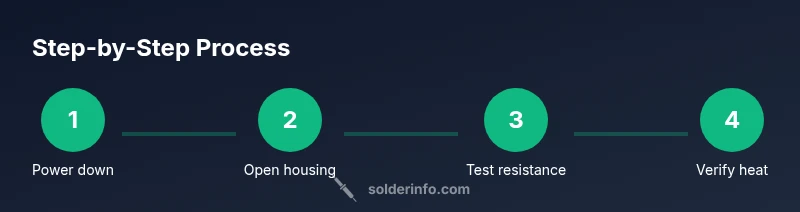
The general approach is to (1) ensure safety, (2) access the heating element and its terminals, (3) measure resistance and check continuity, (4) assess any ground-related faults, and (5) decide on repair or replacement. If readings are wildly out of spec, the element is likely failed. If readings are inconclusive, additional checks like temperature stability testing or professional inspection may be warranted. The diagnostic process reduces guesswork and protects your investments by guiding you toward a correct repair decision.
Common faults and remedies
Typical problems include a completely open circuit (no continuity between terminals), an abnormally low resistance (external short or internal coil damage), or a heating element that shows normal resistance but fails to heat to the expected temperature. Remedies depend on the fault: (a) replace the heating element if resistance is outside spec or continuity is inconsistent, (b) repair loose terminal connections or damaged insulation if found, or (c) replace the entire unit if the element is sealed or integrated with no serviceable parts. Always verify after replacing to ensure reliable heat delivery.
Reassembly, testing, and verification
After repairs or replacement, reassemble the iron carefully, ensuring all terminals are tightened and insulated. Reconnect power and bring the tip to operating temperature in a safe, controlled manner. Use an infrared thermometer or a compatible temperature reference to confirm that the element reaches and maintains expected heat quickly and consistently. If the iron fails to reach target heat or fluctuates wildly, re-check connections and consider professional servicing. Documentation of what you inspected and the results helps future maintenance.
Authoritative sources
For safety standards and best practices, consult reputable sources:
- OSHA: https://www.osha.gov
- NIST: https://www.nist.gov
- IEEE: https://www.ieee.org
These sources reinforce general electrical safety principles that apply when inspecting soldering equipment and handling live electrical components.
How to document results
Keep a simple log of each test, including the equipment used, the model, observed resistance values, continuity status, and whether the unit passed heat verification. Note any unusual readings and the steps taken to address them. Documentation supports warranty claims, guides future maintenance, and helps if you seek expert input later.
Tools & Materials
- Digital multimeter (ohms/continuity)(Set to the lowest practical ohm range; test across heating element terminals and, if applicable, to chassis ground.)
- Screwdriver set (Phillips and flathead)(Used to access the internal terminals and housing when needed.)
- Safety equipment (gloves and eye protection)(Insulated gloves and eye protection reduce risk when handling hot surfaces.)
- Isopropyl alcohol or contact cleaner(Clean terminals gently before testing to remove oxidation.)
- Non-conductive brush or cloth(For cleaning without causing shorts or abrasion.)
- Replacement heating element (optional)(Have a compatible element on hand if tests show an out-of-spec reading.)
- Infrared thermometer (optional)(Helpful for quick non-contact temperature checks during verification.)
Steps
Estimated time: 15-25 minutes
- 1
Power down and unplug
Ensure the iron is unplugged and completely cool before handling. This prevents electric shock and avoids burns from residual heat.
Tip: Double-check the plug is fully disconnected and keep the plug out of reach of children or pets. - 2
Access heating element terminals
Carefully remove the outer shell or handle cover as needed to expose the heating element terminals. Use the screwdriver set when required, and document connections if you plan to reverse the process.
Tip: Take photos of each step to aid reassembly and avoid miswiring. - 3
Visually inspect the element and wiring
Look for melted insulation, burnt marks, loose wires, or corrosion at terminals. Visual signs can indicate imminent failure even before electrical testing.
Tip: Do not force connectors; if you encounter resistance, stop and reassess safely. - 4
Measure resistance across terminals
Set the multimeter to the lowest ohm range and place probes on the two element terminals. A finite reading indicates a closed circuit; an infinite reading suggests an open element.
Tip: If you see erratic readings, clean terminals and retest to rule out poor contact. - 5
Test for continuity to ground where applicable
With power off, check whether any terminal shows continuity to the iron’s metal body. A short to ground may indicate insulation failure.
Tip: Only perform ground checks if your tool design permits a safe, accessible ground path. - 6
Compare with manufacturer specifications
Use the tool’s manual or model label to locate expected resistance and continuity. Deviations beyond reasonable tolerance typically mean replacement.
Tip: If the spec isn’t available, reach out to the manufacturer or refer to similar models with caution. - 7
Reassemble and test heat delivery
Carefully reassemble the housing. Plug in and allow the iron to reach operating temperature while observing steady heat delivery.
Tip: Disconnect if the element shows abnormal heat fluctuations or smells burnt. - 8
Verify results with a temperature check
Use an infrared thermometer or a reference temperature source to verify the heating element reaches and maintains the desired temperature.
Tip: Document the observed temperatures for future maintenance.
Quick Answers
Is a bad heating element the only reason a soldering iron won’t heat?
No. Power supply, damaged cord, or a faulty tip can also prevent proper heating. A full diagnostic should verify each possibility, starting with the heating element itself.
No. Other issues like the power cord or the tip can stop heating as well, so you should check those parts during the diagnostic.
What if I can’t access the heating element because the housing is sealed?
If the housing is sealed, consult the manufacturer’s guidance. Do not force open or modify sealed units, as this can create safety hazards or void warranties.
If the housing is sealed, follow the manufacturer’s guidance and don’t force it open.
Can I test the heating element while the iron is plugged in?
Never test with power on. Always unplug and ensure the unit is fully cooled before performing resistance or continuity checks.
Never test when it’s plugged in. Unplug and cool it first.
Should I replace the heating element or the entire iron?
If the element is modular and within spec, you may replace just the element. If the design is integrated or damaged beyond repair, replacing the entire iron may be more practical.
If the element can be replaced and tests pass, do that; otherwise consider replacing the whole iron.
Are there safe alternatives to a dedicated multimeter for testing?
A multimeter is the safest and most accurate tool for these tests. Other options lack the precise resistance and continuity readings needed for reliable diagnostics.
A multimeter is your best option; other tools won’t give you reliable resistance readings.
Watch Video
Top Takeaways
- Power down before inspection and testing.
- Use a multimeter to check resistance and continuity.
- Compare readings to model-specific specifications.
- Replace the heating element if readings are out of spec.