How to Keep Solder Tip From Oxidizing: A Step-by-Step Guide
Learn proven methods to prevent solder tip oxidation with tinning routines, flux use, proper temperature control, and storage practices for electronics, jewelry, and plumbing soldering—ensuring cleaner joints and longer tip life.


Keep solder tips from oxidizing by keeping the tip clean, tinning regularly, using flux, maintaining correct iron temperature, and storing tips in a protective cap. This quick answer previews a step-by-step approach to minimize oxidation and prolong tip life for electronics, jewelry, and plumbing soldering tasks. It also hints at routine maintenance and proper storage.
Why solder tips oxidize and why it matters
Oxidation on solder tips happens when the copper core and the thin tin plating are exposed to air at elevated temperatures. Tin forms oxides that reduce surface tension and wetting, causing solder to bead rather than flow smoothly. In electronics, jewelry, and plumbing work, oxidized tips lead to cold joints, increased joint defects, and shortened tip life. According to SolderInfo, oxidation results from repeated heat cycles and exposure without timely cleaning; tinning and protective coatings slow the reaction by forming a temporary barrier. However, over time, even well-tinned tips will oxidize if kept hot without cleaning, flux is insufficient, or the tip is worn. The practical takeaway is simple: prioritize cleanliness, precise temperature control, and proper storage to maximize tip lifespan and joint quality.
Pre-cleaning and fresh tip prep
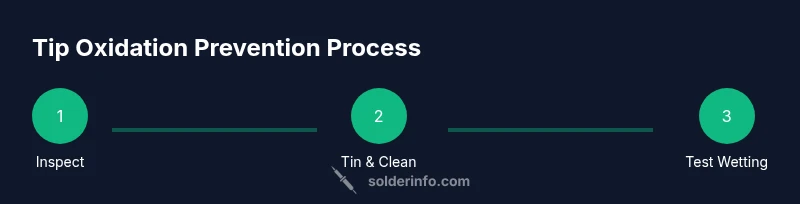
Begin every session by inspecting the tip for visible oxidation, corrosion, or pitting. If you see dull, crusty oxide, clean it while the tip is hot and re-tin with fresh solder to restore a protective surface. Use a damp brass sponge or a copper/wire tip cleaner to wipe away oxidation without scratching plate. Re-tin the tip promptly and ensure a thin, even coat of solder sits on the surface before you start actual work. This pre-cleaning step reduces the risk of introducing oxidized material into joints and helps the iron wet joints more reliably throughout the task.
Work area, PPE, and workstation setup
Operate in a well-ventilated area and keep a clean, heat-resistant mat under your station. Use safety glasses and gloves if handling hot parts, and keep flammable materials away from the soldering area. A stable stand for the iron, a damp sponge for tip cleaning, and an organized layout for spools of solder and flux help reduce accidental tip contamination. The goal is to minimize exposure of the tip to ambient air between uses and to keep the workspace free of grease, oils, and dust that can transfer onto the tip.
Temperature control and flux usage for oxidation prevention
Set your iron to an appropriate operating temperature: lower for leaded solder and slightly higher for lead-free blends, avoiding excessive heat that accelerates oxide formation. Use rosin-core flux or a flux pen to improve wetting and protect the copper surface during soldering. Flux creates a temporary barrier against air and promotes clean, shiny joints. Do not rely on flux alone; combine it with proper cleaning and tinning to sustain tip performance over longer sessions.
Cleaning methods that keep tips oxide-free
Clean the tip with a dampened, brass-cleaning sponge or a dedicated tip cleaner while the iron is hot, then immediately re-tin with fresh solder. After finishing a joint, wipe away residue and re-tin the tip to form a protective layer before storage. Avoid harsh abrasives that may wear away the tip’s plating. For stubborn oxide, lightly rub with a small magnifier and re-tin, then store the tip in a sealed cap to limit oxygen exposure.
Storage and tip maintenance routine
Cool the iron before storage and place the tip in a protective cap or dedicated tip holder with a tiny amount of solder or a thin film of oil-based coating to slow oxidation. Establish a daily routine: quick wipe, re-tin, and return to storage after every session, plus a weekly deep clean and inspection of tip wear. Regular maintenance reduces cumulative oxidation and extends tip life, which keeps your joints consistent and reliable.
Choosing the right tip shapes and thickness to minimize oxidation
Different tip geometries (pointed, chisel, or knife) present different surface areas and oxidation risk profiles. A larger flat tooth, if kept clean and tinned, can be less prone to rapid oxidation during long sweeps, while a fine point is easier to oxidize when it lingers idle. For beginners, starting with a medium-wide chisel tip can balance heat transfer and oxide resistance, then adjust based on project needs. Consistent cleaning and tinning are essential regardless of tip shape.
Troubleshooting stubborn oxidation and when to replace tips
If the tip shows persistent dullness, heavy oxide, or poor wetting even after cleaning, it may be time to replace it. Before discarding, attempt a restoration with tip tinner and re-tin, ensuring the surface is smooth and free of pits. Replacing worn or pitted tips can dramatically improve heat transfer and reduce oxidation risk in future work. Always verify compatibility with your solder type and iron.
Long-term best practices and a maintenance plan
Adopt a maintenance plan that includes: daily cleaning, nightly tinning, periodic tip conditioning with a dedicated compound, and a quarterly review of tip wear. Pair these practices with a clean, flux-equipped workflow and proper storage to maintain oxidation resistance. The SolderInfo team recommends documenting each tip’s lifespan and replacing worn tips proactively to maintain consistent performance over time.
Tools & Materials
- Soldering iron with adjustable temperature control(Set to 350-380°C for lead-free; 320-350°C for leaded; allow stabilization.)
- Lead-free solder (SnCu or SnAg) with rosin core(Rosin-core flux helps wetting and protection against oxidation.)
- Flux pen or additional rosin flux(Useful for enhancing wetting on difficult joints.)
- Tip tinner/conditioning compound(Used to revive oxidized or worn tips between tasks.)
- Damp sponge or brass tip cleaner(Keep tip clean while working; damp sponge prevents excessive abrasion.)
- Isopropyl alcohol (70–90%)(For quick cleaning of residue and oxide after soldering.)
- Lint-free cloth or microfiber wipes(For dry wipe-downs and applying flux without lint.)
- Tip caps or sealed tip holder(Protect tips from air exposure during storage.)
- Ventilated workspace or fume extractor(Reduces inhalation of fumes and keeps air clean.)
- Safety glasses(Recommended for eye protection against splashes.)
Steps
Estimated time: 60-90 minutes
- 1
Power up and warm the tip
Plug in the iron and set it to the appropriate operating temperature. Allow the tip to stabilize for 2–3 minutes so it wets properly when soldering begins.
Tip: Never force cooling; a stable warm tip wets and re-tins more evenly. - 2
Inspect tip and prep
Check for wear, pitting, or heavy oxidation. If needed, clean gently with the damp sponge and re-tin with fresh solder to restore a protective surface.
Tip: If you see pitting, replace the tip instead of trying to salvage it. - 3
Apply flux and confirm wetting
Apply a light film of flux to the joint area or use rosin-core solder. Flux improves wetting and reduces oxide formation during heating.
Tip: Flux helps the solder flow and protect the metal surface; use it strategically on difficult joints. - 4
Tin the tip before use
Apply a thin layer of solder to the tip to form a protective coat. Wipe excess and ensure the surface is evenly coated before starting a joint.
Tip: A well-tinned tip resists oxidation and provides instant wetting when starting a joint. - 5
Perform a test joint
Solder a small test joint on scrap copper to verify wetting and temperature. Adjust heat if the solder beads or skates instead of flowing.
Tip: Always test on scrap material before committing to the actual work. - 6
Clean during work and re-tin as needed
Wipe the tip on a damp sponge or brass cleaner while hot to remove oxidation; re-tin promptly to maintain a protective surface.
Tip: Regular cleaning prevents oxidation buildup during prolonged work. - 7
Post-work care and storage
After finishing, wipe residue, re-tin lightly, and store the tip in a protective cap once cooled. This reduces air exposure and corrosion risk.
Tip: Store tips with a light coat of solder to preserve the plating. - 8
Routine maintenance and replacement
Schedule regular checks for tip wear and plan replacements when performance declines. Keep an inventory of tips to ensure timely changes.
Tip: A proactive replacement plan saves time and preserves joint quality. - 9
Reviving stubborn oxidation
For stubborn oxide, use tip tinner according to manufacturer directions, re-tin, and test. If oxidation persists, replace the tip to restore performance.
Tip: If in doubt, replacing the tip is more cost-effective than pushing a poor-performing tool.
Quick Answers
What causes solder tip oxidation?
Oxidation occurs when air contacts the hot metal surface and oxygen forms oxide layers. Repeated heating, poor cleaning, and insufficient flux speed up the process, reducing wetting and causing poor joints.
Oxidation happens when the hot tip reacts with air. Good cleaning and flux slow it down, keeping joints clean.
How often should I tin the tip?
Tin the tip at the start of each session and re-tin as needed during work to maintain a protective surface and improve wetting.
Tin the tip at the start and as you work to keep it protected.
Is lead-free solder more prone to oxidation?
Lead-free solder can oxidize faster because its alloys spread differently, so diligent cleaning, flux use, and correct temperature are especially important.
Lead-free joints can oxidize a bit faster; clean and flux well to counter that.
Can flux prevent oxidation?
Flux helps prevent oxidation by improving wetting and forming a protective surface during heating. It should be used consistently on joints that wick poorly.
Flux improves wetting and helps protect the tip during heating.
What is the best temperature range to minimize oxidation?
Choose a temperature appropriate for the solder alloy you’re using and avoid running the iron at excessive heat. A stable, moderate temperature reduces oxide formation and prolongs tip life.
Use a steady, moderate temperature suited to your solder and avoid overheating.
How do I revive a heavily oxidized tip?
Attempt restoration with tip tinner and careful re-tinning. If oxidation remains after retreatment, replace the tip to restore performance.
Try a tip tinner and re-tin; if it still won’t wet properly, replace the tip.
Watch Video
Top Takeaways
- Start with a clean, well-tinned tip for reliable wetting.
- Use flux and correct temperature to minimize oxidation during soldering.
- Clean and tin tips between tasks and store properly to extend life.
- Replace worn or heavily oxidized tips promptly to maintain joint quality.