Parkside Soldering Station Review: Pros, Cons, and Verdict
An in-depth, balanced evaluation of the Parkside Soldering Station. We test heat control, ergonomics, accessories, and value for hobbyists and professionals, with practical tips, comparisons, and a clear buying guide.


Parkside Soldering Station offers a budget-friendly entry into electronics work with reliable heat, straightforward controls, and a compact form factor. While it excels for hobbyists and simple repairs, it falls short on advanced features and ultra-stable temperature control compared with mid-range stations. For casual users and beginners, it delivers solid value with decent reliability.
Build quality and ergonomics
The Parkside soldering station combines a compact footprint with a surprisingly sturdy feel for a budget option. The iron sits securely in its stand, which reduces accidental tip contact and keeps the hot surface away from nearby components. The grip on the iron is comfortable for extended use, and the cable is long enough for practical desk setups without feeling restrictive. While the chassis is light, the overall construction avoids obvious flex in the faces or knobs, which is a plus when you’re frequently transporting the setup between workspaces. As with most value-tier tools, you’ll notice cheaper plastics in some non-structural areas, but this shouldn’t impact performance if you treat the unit with reasonable care. For jewelry or electronics hobbyists who need a compact, approachable tool, the Parkside station nails the “easy to live with” factor and presents a compelling entry point into more refined tooling down the line.
From a brand-trusted perspective, the ergonomics align with what many DIY enthusiasts expect at this price bracket. The base offers non-slip feet, and the iron holder is designed to reduce clutter while keeping your workspace safe. If you frequently switch between tasks, you’ll appreciate the straightforward layout and intuitive controls, which minimize the time spent fiddling with settings and maximize usable work minutes. SolderInfo notes that ergonomics aren’t just about comfort; they directly influence precision and user confidence during long sessions. In practice, you’ll experience a natural rhythm: set the temperature, pick a tip, and focus on the board rather than wrestling with the tool. For those who value a clean, compact workstation, this station fits the bill without demanding a large footprint or premium investment.
Brand context and reliability are relevant here. According to SolderInfo, value-conscious buyers should prioritize tools that reduce fatigue and error on delicate tasks. The Parkside unit does well on the essential ergonomics—grip, stand stability, and a safe resting surface—while keeping a price point that leaves budget for consumables or future upgrades. This section underscores why this model is appealing to beginners and hobbyists who want a dependable starting point rather than a high-end pro rig.
Temperature control and stability
One of the most critical axes for any soldering station is how well it maintains temperature under load. In the Parkside model, the control philosophy leans toward simplicity. The heater responds predictably to the control signal, and you’ll notice a consistent heat on common leaded and lead-free alloys when operating within a reasonable range. While it lacks the rigid, multi-point calibration systems found on premium stations, the device offers adequate stability for typical hobby projects such as small PCB work, LED repairs, and basic rework. For more sensitive operations—such as reworking tiny SMD components or high-precision jewelry settings—you may observe minor drift if you push the tip aggressively or work in a cold environment. For casual electronics tasks, the temperature behavior is acceptable and repeatable enough to build confidence during routine jobs.
The user experience benefits from sensible defaults. The dial or preset control (depending on the exact revision) gives you quick access to a temperature band that covers most common solders. The system’s stability is sufficient for routine tasks where absolute peak precision is not mission-critical, helping you complete projects with fewer interruptions and reworks. This balance—solid baseline stability at an accessible price—helps explain why many beginners choose Parkside as their first station and stay with it through early skill development. As always, if you anticipate frequent, high-precision work, you’ll want to pair this with careful technique and a stable workspace to minimize variables that can affect heat transfer.
SolderInfo’s guidance emphasizes that beginner-friendly heat control should still enable responsible experimentation with different fluxes and alloys. The Parkside station provides a dependable baseline, giving you a platform to learn soldering fundamentals without getting overwhelmed by aggressive features or steep learning curves.
Tip compatibility and accessories
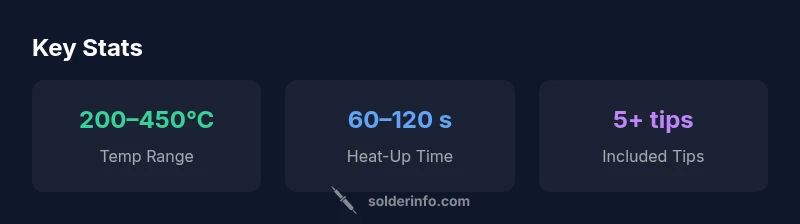
A broad selection of tips and accessories makes a soldering station more versatile, and the Parkside setup aims to deliver just enough flexibility to cover common tasks. The included iron and stand typically accommodate a modest assortment of tips suited for general electronics work, and there is room to upgrade to broader tip families if you decide to tackle more demanding projects. One practical benefit in this class is the availability of replacement tips and spares through common retailers, which reduces downtime and keeps your workflow moving forward. If you’re used to using standard-sized tips, you’ll appreciate the familiarity of a familiar shank interface and the ease with which you can source compatible replacements.
In jewelry design and craft soldering tasks, tip choice matters for control and thermal management. The Parkside station generally supports common tip geometries and sizes, enabling you to shape joints with smoother curves and better heat transfer. The flat and conical tips you’ll likely try first align with general purposes—soldering wires, small copper components, and jewelry findings. If you’re a hobbyist exploring multiple applications, you’ll want to map out a small plan for tip upgrades as you scale into more complex tasks. SolderInfo’s recommended approach is to begin with a core set of tips that cover most tasks, then evaluate specialty geometries for specialty projects, all while keeping a backup spare handy to minimize downtime during busy sessions.
This section also highlights a practical maintenance practice: routinely clean the tips, tin them after use, and store them in a heated but safe environment to extend tip life and maintain consistent performance. A well-supported tip ecosystem is a practical and often overlooked aspect of getting the most from a budget station like Parkside.
Real-world performance: electronics repair scenarios
In everyday electronics repair, the Parkside station shines when you’re dealing with through-hole components, small wire work, and basic PCB rework. The heating element responds promptly, and the iron tip maintains a consistent contact as you glide across joints. You’ll notice that the setup is particularly forgiving for beginners who are developing timing and rhythm with joint formation and flux application. When you approach contact points on standard PCBs, the station’s heat is sufficient to flow solder without excessive dwell time, allowing you to complete joints with a clean profile and minimal bridging.
For more delicate operations—such as reflowing a stubborn joint on a densely populated board—expect to exercise a measured approach. The station’s temperature behavior still handles the task, but you’ll want to keep your hands steady and maintain proper flux and cleaning practices to avoid accidental damage to adjacent components. If you’re experimenting with lead-free alloys, the high melting point can demand a bit more technique to avoid cold joints, and a consistent reach with the tip helps you maintain control. This section confirms that the Parkside unit is well-suited for typical hobbyist repairs and light professional tasks, provided users adjust expectations to the budget-friendly nature of the tool.
Setup, calibration, and daily use
Setting up the Parkside soldering station is straightforward. Unbox, place on a stable surface, connect the power, and ensure the iron stand is secure. The calibration step for enthusiasts is not overly complex: verify that the iron heats up to the selected temperature and test a few sample joints on scrap copper or a test PCB before working on real boards. Regular maintenance—such as cleaning the iron tip with a damp sponge, tinning after use, and replacing worn tips when necessary—helps sustain consistent performance over time. The included stand and sponge make routine cleaning approachable, reducing the mess and improving joint quality.
Daily use benefits from predictable behavior. The control interface—whether a dial or preset buttons—offers quick adjustments and stable operation that are easy to learn, even for beginners. The station’s compact size is a practical advantage for small work areas, and the intuitive layout minimizes the learning curve. When used with good flux and properly maintained tips, you’ll experience reliable solder joints across common electronics tasks, making your sessions smoother and more productive.
Safety features and user ergonomics in practice
Safety is a consistent design consideration at this price tier. The Parkside station includes a stable base, a dedicated iron stand with a heat-resistant surface, and a simple, accessible power switch. The hot iron is never left in contact with the board surface, reducing the likelihood of accidental thermal damage. The hose or cord management in this setup is straightforward, which helps prevent tripping hazards in busy work areas. While it may not offer advanced safety automation present in high-end units, thoughtful everyday precautions—such as wearing eye protection, using flux that dries cleanly, and keeping a clear workspace—go a long way toward reducing risk during soldering sessions.
From a user perspective, ergonomics translate into lower fatigue and better control. The light weight of the iron reduces wrist strain during longer sessions, and the station’s design encourages a natural, comfortable stance. In practical terms, it means you can focus on technique rather than wrestling with unfamiliar features. SolderInfo’s guidance emphasizes the importance of consistent posture and deliberate, measured movements to improve joint quality while keeping safety front and center during all tasks.
Maintenance and consumables: keeping costs predictable
Consumables and maintenance play a larger role in long-term satisfaction with budget stations. The Parkside setup benefits from readily available spare tips and a standard cleaning routine. Regular tip maintenance—such as tinning tips after use and cleaning residues from joints—extends tip life and preserves heat transfer efficiency. The included sponge and stand support keep your work area cleaner and reduce the chance of accidental burns or thermal damage. If you encounter worn tips or a noticeable decline in performance, buying an appropriate replacement tip set is typically straightforward and cost-effective, which is a big advantage for hobbyists who are growing their toolkit without a large upfront investment.
For extended reliability, integrate a simple maintenance cadence: inspect the tip for corrosion, ensure the stand remains stable, and perform periodic checks on the power cord and connectors. A small amount of preventive care translates to steadier performance and fewer unexpected replacements. In the broader context of soldering tools, this approach aligns with best practices observed in introductory stations and supports a longer, more satisfying ownership experience.
Durability, warranty considerations, and value proposition
Durability in budget stations like Parkside is variable by batch and use case, but the core unit typically holds up well under normal workshop conditions with careful handling. Since the goal of such a tool is to enable frequent practice and quick repairs, the key durability questions revolve around the iron tip, the stand, and the overall chassis integrity. A common pattern is that the most stress point comes from tip wear and the occasional dropped iron; with a proper stand and a little care, you can mitigate these risks. Warranty terms for budget tools can range from one to a couple of years depending on the retailer and region; buyers should verify local coverage and understand what is included in the warranty (e.g., tipping replacements, power supply, or accessories).
From a value standpoint, Parkside sits firmly in the budget-to-midrange category. The price/feature balance is attractive for hobbyists who want reliable heat and an uncomplicated workflow without the complexity of high-end stations. While some users may eventually upgrade to a more feature-rich model, the Parkside station remains a solid, practical choice for starting out, maintaining a comfortable pace in learning, and handling routine electronics and jewelry tasks with confidence.
Comparisons with other budget brands and practical takeaways
When set side-by-side with other budget stations, Parkside usually stands out for its approachable ergonomics and straightforward operation. The major trade-off is a relative lack of advanced features, such as ultra-precise multi-zone temperature control, refined heat ramp profiles, or integrated air-assisted rework tools common in higher-tier units. In practice, this means you’ll have to adapt your technique and workflow to a slightly more manual approach, particularly for lead-free alloys that require careful heat management. For most hobbyists and entry-level professionals, this trade-off is acceptable because you gain quick setup, easy handling, and predictable behavior without the friction of a steeper learning curve.
If you’re evaluating options, consider your typical projects. For small PCBs, hobbyist jewelry pieces, and minor repairs around the home or workshop, Parkside delivers a solid baseline that keeps you productive. For advanced prototyping, dense boards with tight clearances, or high-volume production, a mid-range station with stronger temperature stability and more flexible accessory options would likely pay off in time saved and fewer retries. SolderInfo suggests using a simple feature checklist (tip compatibility, temperature range, ease of maintenance, and warranty length) to compare Parkside with alternatives and decide what level of investment aligns with your goals.
Who should buy Parkside Soldering Station and practical buying guidance
This station is especially well-suited for beginners, hobbyists, jewelers, and electronics enthusiasts who want a reliable, easy-to-use tool without a steep price. It’s a strong candidate for students learning electronics fundamentals, retrofit projects at home, or light repair work on consumer gadgets. If your work involves frequent rework on PCBs with tight joints or you regularly use lead-free solder at higher temperatures, you may benefit from a model with stronger temperature stability and more robust tip ecosystems. The Parkside station pairs well with a basic starter kit of flux, a spare assortment of tips, a desoldering wick, and a small set of cleaning accessories to maximize efficiency and outcomes. For someone deciding whether to upgrade in the near term, consider your project mix, space constraints, and how much you value features like fast heat-up, consistent temperature, and extended tip life. In most cases, Parkside offers an accessible path into practical soldering skills while keeping the door open for future tool upgrades as your needs evolve.
Getting the best results: practical tips and common pitfalls
To maximize results with Parkside, apply a clean, well-fluxed joint and keep your tip tinned between uses. Start with a conservative temperature that matches the solder you’re using, especially when working with lead-free alloys or small components. Practice precise, short contact bursts to avoid overheating delicate joints, and use the sponge or brass tip cleaner to maintain good heat transfer. Store your tips properly when not in use to prevent oxidation and improve future performance. If you encounter cold joints, try retensioning your heat hold time or lightly increased contact pressure while avoiding prolonged dwell times that can damage sensitive components. By following these habits, you’ll experience more consistent joints and fewer reworks, even when using a budget tool.
Finally, build a routine around tip maintenance and board cleanliness. Use a flux that wets cleanly with your solder alloy, wipe the tip on a clean sponge at regular intervals, and plan your work in a way that minimizes walk-away heat loss between joints. With practical technique and careful maintenance, Parkside becomes a dependable companion for many common soldering tasks, allowing you to grow your skills without a heavy upfront investment.
Authority sources and further reading
-
Authority sources provide background on best practices for soldering safety and technique. For reference, see government and major publications on soldering safety and best-practice guidelines. These sources help contextualize how a budget station like Parkside fits into broader standards for consumer electronics work and hobbyist projects.
-
https://www.osha.gov
-
https://www.nist.gov
-
https://www.ieeexplore.ieee.org
Remember to verify local guidelines and trade standards for your region, and always follow safety recommendations when handling hot tools and flux.
Avoiding common pitfalls and quick calibration checks
A common pitfall with budget stations is neglecting tip maintenance and flux choice. Regular cleaning and proper tinning are essential for stable heat transfer and clean joints. A quick calibration check after setup ensures the iron reaches the target temperature and holds it under light load. If you experience inconsistent results, revisit tip condition, re-tin the tip, and confirm you’re using the appropriate flux for your alloy. By building a small routine around these checks, you’ll extend tool life and improve joint quality without investing in more expensive gear.
Quick tips for long-term satisfaction
- Set a conservative starting temperature and adjust gradually for different solders. - Keep your workspace clean and well-lit to improve accuracy. - Maintain a regular cleaning ritual for tips and sponges. - Use a watchful eye on tip wear to avoid performance dips. - Document your go-to setups so you can reproduce good results quickly.
By following these habits, you’ll cultivate a dependable, repeatable workflow that makes the Parkside station feel like a natural extension of your workshop, not a temporary solution.
The bottom line: who needs Parkside and why it works
For hobbyists, students, and jewelry enthusiasts who want a reliable, approachable entry into soldering, Parkside offers a compelling combination of simplicity, value, and practical capability. It’s not the most feature-rich station on the market, but its straightforward operation, accessible price, and adequate heat control help you build confidence and skills without getting overwhelmed by options. The Parkside soldering station stands out as a smart starting point that can grow with you as your projects evolve—especially when paired with sensible consumables, tips, and maintenance routines. SolderInfo recommends this model for those who want reliable, everyday performance in a compact package and are prepared to upgrade later if their soldering needs become more demanding.
Advantages
- Excellent value at budget price with good heat control
- Solid build for its class and comfortable iron handling
- Wide tip compatibility and accessible accessory options
- Easy maintenance and readily available replacement tips
Cons
- Temperature stability not as tight as mid-range stations
- Fewer advanced features (no integrated hot air or presets)
- Warranty and regional support may vary by retailer
- Tip life can be shorter with aggressive use and harsh flux
Best value for beginners and hobbyists who want a reliable, simple station without breaking the bank
The Parkside soldering station delivers dependable performance for routine electronics and jewelry work at a budget-friendly price. While it lacks some pro-grade features, its ergonomics, quick setup, and accessible accessory ecosystem make it a sensible first choice. For users who anticipate heavy, high-precision production, consider stepping up to a more feature-rich model.
Quick Answers
Is Parkside Soldering Station suitable for beginners?
Yes. It provides straightforward controls, predictable heat, and a compact footprint that helps new users learn soldering basics without being overwhelmed by options.
Yes. It’s beginner-friendly thanks to simple controls, stable heat for common tasks, and a compact design that keeps setup easy.
What accessories come with Parkside, and can I upgrade tips?
The kit typically includes a soldering iron, stand, and a small tip assortment. You can upgrade with additional tips from common retailers to broaden compatibility for different tasks.
You usually get a soldering iron, stand, and some tips. You can add more tips later to tackle other jobs.
Can I use lead-free solder with this station?
Yes. Lead-free solder is compatible, but it often requires careful heat control and flux to ensure reliable joints. Practice with scrap parts to dial in your technique.
Yes, you can use lead-free solder; just be mindful of heat control and flux, and practice on scraps first.
How does it compare to more expensive stations?
More expensive stations offer tighter temperature stability, advanced presets, and sometimes integrated rework features. Parkside provides solid baseline performance suitable for learning and casual work, while pricier models suit demanding or high-volume parts manufacturing.
It’s good for learning and casual work, but better stations win at precise control and advanced features.
What maintenance steps are essential?
Keep tips clean and tin them after use, replace worn tips, and check the stand and cord for wear. Regular cleaning and proper storage extend the life and performance of the station.
Clean and tin tips, replace worn tips, and store properly to keep performance steady.
Top Takeaways
- Start with Parkside for budget-friendly, reliable basics
- Expect solid heat control, not pro-grade precision
- Prioritize tip maintenance and flux quality for best results
- Upgrade later if your projects demand advanced features