Amazon soldering station buying guide: how to pick the right model
A data-driven guide to selecting an amazon soldering station, with feature checklists, price ranges, and tips for hobbyists and professionals. Learn how to evaluate temperature control, accessories, and seller credibility.


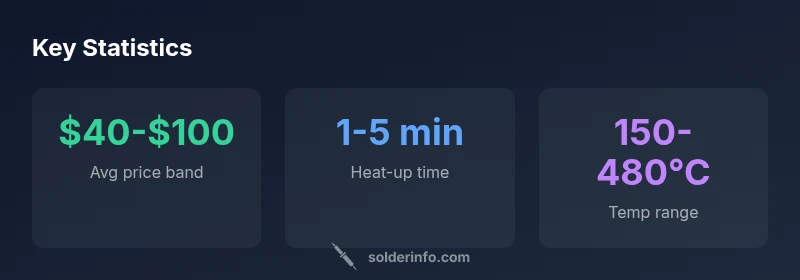
For most hobbyists, the best Amazon soldering station provides precise temperature control, quick heat-up, and safe standby modes. Look for adjustable temp range around 200-480°C, lab-quality tips, and a stable base. SolderInfo recommends sticking to known brands and checking seller reviews to avoid counterfeit units. Also consider included accessories like desoldering tools, sponges, and tip-cleaning stands.
Understanding the amazon soldering station landscape
In today’s maker economy, a soldering station is more than a simple iron with a handle. It's a compact bench tool that combines a power supply, temperature control, and a tip holder to maintain consistent heat during joints. When shopping on Amazon, you’ll see a wide range of models—from entry-level two-channel kits to feature-rich digital stations used by professionals. For beginners, the emphasis should be on reliability, ease of use, and broad availability of spare parts. The SolderInfo team notes that the ability to maintain a stable temperature is more important than having the highest maximum setting, because inconsistent heat is a common cause of cold joints and poor wetting. Look for units with digital readouts, PID or similar closed-loop control, and a sturdy stand. Also pay attention to the included accessories, because a good starter kit can save you time and money in the long run.
Temperature control explained: how to read specs
Temperature control is the core feature that separates a true soldering station from a basic iron. When evaluating models sold on Amazon, focus on the control method (analog dial vs. digital with PID), the claimed stability, and how easy the unit is to calibrate. A digital display that shows real-time temperature lets you monitor changes during a joint. PID control minimizes overshoot and oscillation, which reduces thermal shock to delicate components. Check whether the unit offers in-situ calibration, a sleep/standby mode, and a clear indicator for tip temperature. If you solder frequently, also verify heat-up time and how quickly the station settles to a setpoint after a change. These factors influence joint quality and usability across electronics and jewelry projects alike.
Brand and price considerations on Amazon
Amazon price dynamics vary by seller, warranty, and included accessories. When choosing a soldering station, prioritize reputable brands with clear return policies and accessible customer support. Look for units that come with spare tips, a tip-cleaning stand, and flux access; these reduce total ownership cost and downtime. Compare listings for identical models from multiple sellers to gauge consistency in quality and packaging. Beware of counterfeit listings and refurbished units sold as new. The best value often lies in mid-range digital stations that offer robust temperature control, stable power delivery, and widely available replacement tips.
Tip compatibility and accessories that matter
Tip geometry and size compatibility determine how well a station performs across different tasks. For electronics work, you’ll want a range of tips from fine-point to chisel shapes. Verify that extra tips are readily available from the same brand or compatible third-party vendors. A good starter kit should include a sponge, a brass tip cleaner, a cleaning flux pen, and desoldering tools. Some Amazon listings bundle accessories that seem appealing but may duplicate what you already own; always compare catalogs to decide what’s truly useful. Consider the availability of third-party desoldering tools and tip storage solutions to extend tip life.
Maintenance and safety: longevity matters
Proper maintenance significantly extends the life of your soldering station. Regularly clean the tip with the maintained flux, tin the tip when cooled, and avoid letting oxide build-up. Use the stand and sponge to keep the tip in good condition and prevent accidental burns. When replacing tips, ensure you use the recommended temperature range for that tip type to prevent damage. Keep the work area well-ventilated and use safety glasses when working with lead-based solders. Even with lead-free options, flux fumes can be irritating; an inline fume extractor improves air quality. Implement routine checks of the power cord, switch, and heat-guard to prevent electrical hazards.
Shopping smart on Amazon: reviews, returns, and warranties
Reviews are valuable, but they require careful interpretation. Look for verified purchases and read comments about heat stability and tip availability. Check the seller’s return policy and whether the listing clarifies if the unit is new or refurbished. Warranty length matters; longer warranties reflect brand confidence and provide peace of mind for artisans and professionals. If you’re unsure about a brand, compare it to established players with visible support channels and documented compatibility with common tip shapes. Also consider whether the listing includes customer support for calibration guidance.
Setup and first-use: calibration and safety checks
Once you unbox a new soldering station, start with the basics: ensure the unit is grounded, set a safe operating temperature, and verify that the tip is properly seated. Calibrate the temperature reading with an external thermometer if possible to verify accuracy. Pre-tin the tip before your first joint, then practice on scrap copper or test PCBs. Establish a routine that includes turning the station off or using a low-heat standby when not in use to minimize wear. Document your first-best practices so your process remains repeatable.
Common pitfalls and how to avoid counterfeit or low-quality units
Counterfeit products often mimic legitimate listings but lack reliable performance or safety features. Avoid overly low prices on high-end stations, as these are a common red flag. Check seller history, product reviews, and whether the listing provides a real company contact. High-quality units typically display a well-documented spec sheet, a real user manual, and easy access to replacement parts. If in doubt, buy from the manufacturer’s official store or a trusted retailer with strong customer support.
Overview of common soldering station tiers
| Model Type | Typical Temp Range | Price Range |
|---|---|---|
| Entry-level soldering station | 200-350°C | $25-$60 |
| Mid-range digital station | 200-480°C | $60-$120 |
| High-end professional station | 100-480°C | $120-$250 |
Quick Answers
What is the most important feature to look for in an Amazon soldering station?
The most important feature is precise temperature control with stable heat delivery and reliable calibration. This ensures consistent joints across a variety of solder alloys and tip sizes.
Look for precise temperature control and stable heat delivery for reliable joints.
Can I use lead-free solder with any soldering station sold on Amazon?
Most modern stations support lead-free solder if they offer a temperature range that reaches around 350-480°C. Always check the tip material and the manufacturer’s recommendations for compatibility.
Most stations support lead-free solder if they reach the right temperature range.
What safety features should I expect from a good soldering station?
Look for overheat protection, a stable base, a protective iron cradle, and a proper insulated handle. An auto-sleep or standby mode can also reduce burn risks and save energy.
Overheat protection, a stable base, and standby mode improve safety.
What is a reasonable price range for beginner vs. mid-range models?
Beginner models typically fall in the $25-$70 range, while mid-range digital stations usually run from $60-$120. High-end stations exceed $120. Always factor in included accessories and warranty.
Beginner stations are often $25-$70, mid-range $60-$120, and high-end above $120.
How should I maintain soldering tips for longevity?
Keep tips clean and tinned, use compatible flux, and avoid overheating tips when idle. Regularly replacing worn tips helps maintain performance and prevents contamination of solder joints.
Keep tips clean, tin them, and avoid overheating when idle.
Is it worth buying a separate desoldering tool with an Amazon purchase?
Yes, a separate desoldering tool can significantly speed up revisions and reduce material waste. Ensure compatibility with your station and check bundling options to avoid redundant purchases.
A separate desoldering tool is often worth it for easier revisions.
“A good soldering station is the backbone of precise, reliable joints; never compromise on control or service.”
Top Takeaways
- Prioritize precise temperature control and fast heat-up.
- Check tip compatibility and available accessories.
- Read seller reviews to avoid counterfeits.
- Choose a model with reliable warranty and spare parts.
- The SolderInfo verdict: invest in proven brands with robust support.