Guide to Soldering Electronics: A Practical Tutorial
A comprehensive, beginner-friendly guide to soldering electronics. Learn safety, tool selection, technique, inspection, and troubleshooting to build reliable connections on PCBs, wires, and prototypes.


This quick guide to soldering electronics shows you how to prepare your board, select the right solder and flux, and create clean, reliable joints. You’ll learn essential safety, tool setup, and stepwise techniques that minimize cold joints and bridges, so you can confidently complete electronics projects from hobby boards to prototypes.
Why Soldering Electronics Matters
Soldering is how we create reliable electrical connections on PCBs, connectors, and wires. A good solder joint ensures conductivity plus mechanical strength, which is essential for durable electronics. Whether you’re building a simple LED indicator or prototyping a microcontroller project, mastering soldering reduces failure rates and speeds up development. As you embark on a practical journey, a solid foundation in surface prep, heat management, and flux control will pay off with consistent results. This guide to soldering electronics emphasizes safe practices, proper tool use, and a repeatable workflow that you can apply across many project types. According to SolderInfo, a structured approach helps beginners gain confidence and achieve better outcomes more quickly. By prioritizing cleanliness, correct temperature, and controlled movements, you’ll develop muscle memory for precise joints and clean boards.
Essential Safety and Workspace Setup
Safety is the first tool in any soldering workflow. Work in a well-ventilated area to avoid fume buildup, wear impact-resistant safety glasses, and keep flammable materials away from your heat source. Ground yourself to minimize static discharge, and use a stable work surface with good lighting. Organize components, tools, and spare parts so you can reach what you need without shifting focus. A tidy, dedicated station reduces the risk of burns and dropped components and makes troubleshooting easier. Remember to unplug heaters before adjusting setups and keep a fire extinguisher nearby if you are new to soldering. A disciplined workspace not only keeps you safer but also improves consistency, especially when soldering multiple joints in a row. SolderInfo emphasizes safety as a core habit that supports long-term skill growth.
Choosing Tools and Materials
Your toolkit defines the quality of your soldering work. Start with a temperature-controlled soldering iron and a fine-tipped iron for precise joints. Select lead-free solder with rosin-core flux to ensure clean wetting and easier cleanup. A sturdy soldering stand, a damp sponge or brass tip cleaner, and desoldering braid are essential companions for clean cycles between components. Add a digital multimeter for quick continuity checks and a small magnifier or loupe for inspecting fine joints. Invest in anti-static tweezers for handling sensitive components and a spare parts tray to organize resistors, capacitors, and connectors. For safety, include safety glasses, ventilation or a small fume extractor, and a dedicated, uncluttered workspace. According to SolderInfo, choosing the right tools and basic consumables sets the foundation for reliable, repeatable results across electronics projects.
Understanding Solder, Flux, and Wires
Solder is the filler metal that creates the joint, while flux helps remove oxides and improves wettability for a strong bond. Most electronics use lead-free solder (often Sn-Cu or similar alloys) with rosin-core flux for efficient cleaning during heating. Flux types vary from rosin cores to water-soluble formulations; rosin-core is common in hobby and education settings because it’s easy to clean and relatively forgiving. Wires and component leads should be clean and properly trimmed, preventing solder bridges and tombstoning. Keep tips clean, and avoid overheating sensitive components which can cause delamination or insulation damage. Understanding the role of flux and alloy composition helps you select the right materials for your board and environment, reducing rework and ensuring durable electrical connections.
PCB Preparation and Joint Basics
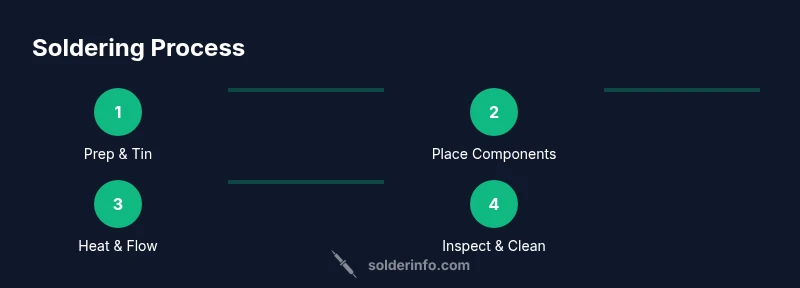
Before you apply heat, clean the copper traces and pad areas to remove oils and oxides. A clean surface promotes better solder wetting and stronger joints. When components are placed, align them correctly and secure in place to prevent shifting during heating. Tin the soldering iron tip briefly to establish a good heat transfer surface, then lightly tin the component leads and pads to improve wetting. Heat the pad and lead assembly evenly, then feed solder to the joint, letting capillary action draw it into the joint rather than forcing it with the iron. After cooling, inspect for shiny, smooth fillets with no gaps or bridges. Proper joint geometry is essential for reliable electrical performance, especially on high-frequency or precision boards. SolderInfo notes that a consistent technique reduces defects across your builds.
The Correct Soldering Technique
Begin by warming the joint with the iron, then touch the solder to the joint, not the iron tip. This ensures the joint absorbs heat rather than the tip, producing a clean, rounded fillet. Avoid applying solder directly to the pad or the component lead alone; the target is a smooth, shiny connection that wets both surfaces. Maintain a steady hand and use a minimal amount of solder to prevent blobs and bridges. If a joint doesn’t wet well, reheat it with fresh flux and apply a tiny amount of solder to restore flow. Keep the iron tip clean; a contaminated tip diminishes heat transfer and increases the risk of cold joints. When working with dense boards, use a temperature-controlled iron, a heat sink for sensitive components, and avoid prolonged heating on any single joint—this reduces damage and improves reliability.
Troubleshooting Common Problems
Cold joints appear dull or cracked and often indicate inadequate heat or poor wetting. Bridges occur when excess solder connects adjacent pads; fix by reheating and removing excess solder with wick. If components shift during heating, secure them with tweezers or a helping hand and reflow carefully. Intermittent connections can result from broken leads or oxidation; clean the pads and ensure solid, consistent contact. Flux residues are generally harmless but can attract dust over time; clean with isopropyl alcohol after inspecting. Excessive heat can ruin delicate components (like LEDs and IC pins); always use heat sinks and limit dwell time on sensitive parts. By recognizing these symptoms early, you can rework joints efficiently without sacrificing board integrity.
Finishing, Inspection, and Cleanup
Finish by cleaning flux residues with isopropyl alcohol and a lint-free wipe to prevent corrosion and charge buildup. Inspect each joint from multiple angles, looking for uniform fillets and absence of voids or bridges. If you discover a defect, rework the joint with flux, reheat gently, and recheck conductivity with a multimeter. Store tools properly to prevent corrosion, and wipe down the work area to remove solder splashes. Label boards clearly or photograph them for future reference, especially when building prototypes. Regular practice with inspection patterns helps you spot subtle issues quickly and reduces late-stage debugging.
Practical Project Walkthrough: A Simple Circuit
We’ll assemble a basic LED with a resistor on a small PCB to illustrate the core techniques. Start by placing the resistor and LED in the correct orientation, then secure with a clamp or tape. Tin the tip, heat the pad and lead together, and apply a small amount of solder to form a compact, hooded joint. Inspect the joint for a smooth, shiny fillet, then test continuity and voltage with a multimeter. If the LED does not light, recheck polarity, verify resistor value, and ensure there’s no short-circuit. This practical example reinforces the steps you’ve practiced and demonstrates how to approach common circuit-building tasks with confidence.
Next Steps and Learning Resources
Now that you’ve learned the essentials, continue practicing with progressively complex boards, such as small microcontroller projects, sensor boards, or SMT tasks. Seek out reputable tutorials and community projects to compare techniques and joint quality. Maintain your toolkit by updating tips and fluids, and expand your safety knowledge to include hot-work practices and ventilation optimization. Consider joining local maker spaces or online soldering communities to share results and receive feedback. The ongoing practice will strengthen your muscle memory and enable faster, more reliable soldering across electronics projects.
Tools & Materials
- Soldering iron (temperature-controlled)(Prefer a fine tip for precise work and good heat transfer without overheating components.)
- Solder wire (lead-free recommended)(Choose a wire compatible with electronics; rosin-core flux improves wetting.)
- Flux (rosin-core or liquid flux)(Flux cleans oxides and improves wetting; apply sparingly.)
- Soldering iron stand(Keeps hot iron secure and reduces fire risk.)
- Sponge or brass tip cleaner(Clean the tip between joints to maintain heat transfer.)
- Desoldering braid (solder wick)(Used to remove excess solder or fix bridges.)
- Wire cutters/flush snips(Trim component leads close to the joint.)
- Safety glasses(Protect eyes from splashes and fumes.)
- Ventilation or fume extractor(Minimize inhalation of fumes during soldering.)
- PCB holder or helping hands(Helpful for stability with small boards.)
- Multimeter(Test continuity and voltage after assembly.)
Steps
Estimated time: 60-90 minutes
- 1
Set up workspace and safety
Prepare a well-ventilated area, gather tools, and wear safety glasses. Ensure the board is clean and stable, and unplug power before handling components to avoid accidental shorts.
Tip: Keep a water spray bottle and a small brush handy to manage flux spills quickly. - 2
Test tools and components
Verify that the soldering iron heats properly and the tip is clean. Inspect on-board components and resistors for visible damage before starting.
Tip: Calibrate temperature settings to avoid overheating sensitive parts. - 3
Tin the iron tip
Heat the tip briefly and apply a small amount of solder to form a shiny, protective layer. This improves heat transfer during joints.
Tip: A tinned tip prevents oxidation and ensures consistent heat delivery. - 4
Place components and secure
Insert leads into pads or use a clamp to hold parts in place. Double-check polarity for diodes, LEDs, and ICs.
Tip: Secure components so they don’t shift while you apply heat. - 5
Heat and apply solder to joints
Touch the joint with the heated tip and feed solder to the joint, not directly onto the iron. Remove heat as soon as the joint is filled.
Tip: Avoid applying solder to the iron tip; aim for a smooth, shiny fillet. - 6
Inspect and rework if needed
Look for dull, cracked, or bridged joints. Reheat and apply a tiny amount of flux and solder to improve wetting.
Tip: If you see a bridge, rework with the wick to remove excess solder. - 7
Clean and inspect flux residues
Wipe away flux with isopropyl alcohol and a lint-free cloth after inspection. Ensure no sticky residue remains that could attract dust.
Tip: Flux residue is usually harmless, but cleaning improves longevity. - 8
Test the circuit
Power the circuit and test functionality with a multimeter. Check for correct resistance, continuity, and expected voltage readings.
Tip: Document results for future reference and troubleshooting.
Quick Answers
What is soldering?
Soldering is a method to join metal surfaces using a filler metal (solder) that melts at a lower temperature than the workpieces. It creates electrical and mechanical connections essential for electronics assemblies.
Soldering is a technique that joins metals with a special filler metal that melts at a lower temperature than the parts being joined.
What solder should I use for electronics?
For most electronics, lead-free solder with a rosin-core flux is standard. It provides good wetting and is easier to clean after heating.
Use lead-free solder with rosin-core flux for most electronics projects.
Do I need to wash flux off after soldering?
Rosin flux is generally safe, but cleaning flux residues helps prevent long-term corrosion and dust accumulation on the joint.
Flux residue is usually harmless, but it's good practice to clean it off after soldering.
Why are some joints dull or cracked?
Dull or cracked joints usually result from insufficient heat, poor wetting, or excessive movement during cooling. Rework with proper heat and flux to fix.
Dull joints mean they weren’t heated or wetted correctly; rework with flux and heat.
Can soldering damage components?
Excessive heat or prolonged contact can damage components. Use heat sinks, short dwell times, and gentle, steady motion to protect sensitive parts.
Be careful with heat—too much can damage small parts; use a heat sink and work steadily.
Is lead in solder dangerous?
Lead-free solders are preferred for electronics to minimize risk. Work in a ventilated area and handle waste responsibly.
Lead-free solders are safer for electronics; make sure the area is ventilated.
Watch Video
Top Takeaways
- Learn the safety-first approach before diving in
- Choose the right tools to improve joint quality
- Master tinning, placement, and controlled heat for clean joints
- Inspect joints from multiple angles to catch issues early
- Practice with simple projects to build steady technique