Why Is Solder Not Flowing? Quick Troubleshooting Guide
Diagnose why is solder not flowing with a step-by-step flow, safety tips, and expert guidance from SolderInfo. Learn common causes and fixes for reliable joints.


Most likely cause is insufficient heat transfer from a dirty or oxidized tip, or using the wrong solder alloy. Start by cleaning and tining the iron, replacing the tip if needed, and applying steady heat to the joint while feeding solder at the correct rate. If solder still won’t flow, re-tin the tip and clean the pad before reattempting.
Why Solder Not Flow: A Practical Overview
The question many hobbyists ask is, why is solder not flowing, and what should I fix first? According to SolderInfo, the single most common reason solder refuses to flow is heat transfer problems at the joint. A dirty, oxidized tip or using the wrong alloy can prevent heat from reaching the pad, causing solder to bead or stay put rather than form a reliable joint. In practice, nearly every case comes down to heat, cleanliness, and flux. This section explains how heat, surface condition, and flux interact to determine flow, and what you can do quickly to restore proper flow without risking damage to components. By following a systematic approach, you can avoid cold joints and weak connections. The SolderInfo team recommends starting with the tip and pad before moving to more involved remedies.
Common Causes and How They Show Up
- Dirty or oxidized tip: A tarnished tip creates poor heat transfer and causes solder to hesitate. This is the most frequent culprit when you wonder, why is solder not flowing. - Incorrect flux: Flux not present or expired flux can prevent oxide removal, so solder won’t wet the surface. - Pad or surface oxidation: Oxidized pads resist wetting and force you to overheat, which can damage the board. - Wrong alloy for the task: Using a tough alloy on delicate pads can impede flow and create dull joints. - Worn or damaged tip: A bent, pitted, or pitted tip loses contact area and heat transfer reliability. The combination of heat, surface condition, and flux explains most instances of stubborn flow.
Essential Tools and Materials to Fix Flow Issues
To fix solder not flowing, you need the right toolkit: a clean, well-tinned tip; appropriate flux (rosin-core or no-clean depending on the work); solder suitable for the project (leaded or lead-free); a tip cleaner or brass sponge; and a steady heat source. Keep a spare tip in case of wear and carry flux brushes. Remember, the goal is to maximize heat transfer to the joint while preserving the pad and surrounding components. In many cases, simply re-tinning the tip and reapplying flux makes the difference between a stubborn joint and a solid solder connection. When diagnosing why solder won’t flow, ensure your materials are fresh, compatible, and clean, and that you’re using an appropriate temperature range for the alloy.
Safe, Stepwise Troubleshooting Before You Rework a Joint
Safety first: unplug equipment when inspecting or changing tips, and avoid contact with hot surfaces. Start by inspecting the tip for oxidation and wear, clean or replace as needed, and re-tin. Apply flux to the joint surface, then gently heat the area while feeding solder. If the joint still refuses to flow, stop and reassess; you may be dealing with pad contamination or oxidation that requires targeted cleaning with isopropyl alcohol and gentle abrasion. Throughout, keep spills and splatter to a minimum by using a steady hand and a properly supported iron.
The Diagnostic Path: When to Try More Advanced Fixes
If basic steps fail, you may be facing deeper issues like troubled pads, excessive oxidation on the PCB, or incompatible flux. In such cases, review the entire process: flux choice, solder alloy, heat application, and pad condition. Consider cleaning pads with isopropyl alcohol and a soft brush, using a flux pen on stubborn joints, and trying a different tip or solder alloy. In persistent cases, professional evaluation may be warranted to avoid board damage, especially for delicate electronics.
Mastering Solder Flow: Prevention Tips and Best Practices
Preventing flow problems starts with habit formation. Always keep your tip clean and well-tinned, store flux properly, and verify you’re using the correct alloy for the task. Practice consistent heat control rather than rushing the joint; slow, even heat improves wetting and reduces the risk of heat damage. Regular maintenance, including tip replacement when worn and proper flux handling, significantly reduces the frequency of solder-not-flow issues. By building a routine that emphasizes cleanliness, preparation, and controlled heat, you’ll minimize downtime and improve joint quality.
Steps
Estimated time: 30-60 minutes
- 1
Inspect and clean the tip
Power off and unplug the iron. Wipe the tip on a brass sponge or copper pad, then tin with fresh solder. This removes oxidation and ensures good heat transfer for the next attempt.
Tip: A clean, well-tinned tip is your first defense against poor flow. - 2
Apply fresh flux to the joint
Brush or apply flux to the joint surface. Flux reduces oxide formation and helps solder wet the surface more reliably. Make sure you’re using the right flux for your solder type.
Tip: Flux is essential for preventing re-oxidation during heating. - 3
Re-tin the tip and pad
After applying flux, re-tin the tip and lightly re-tin the pad edges to establish a clean, wetted surface. This creates a ready path for solder to flow.
Tip: Keep the pad hydrated with flux to aid wetting. - 4
Heat the joint, not the solder
Place the tip on the joint and heat the pad evenly. Feed solder into the joint at a steady rate once it starts to melt. Do not press solder directly onto the tip.
Tip: A consistent feed prevents cold joints and ensures even wetting. - 5
Evaluate and repeat if needed
If the solder does not flow, reassess tip condition, flux freshness, and pad cleanliness. Repeat steps 1-4 or move to a suitable alternative alloy if necessary.
Tip: Small adjustments can solve most stubborn joints. - 6
Final inspection and cleanup
Check for a smooth, shiny joint with good wetting and no bridging. Clean excess flux and store tools properly to prevent corrosion and tip degradation.
Tip: A tidy workstation reduces future flow problems.
Diagnosis: Solder won't flow onto joints or pads
Possible Causes
- highCold or oxidized tip
- mediumInadequate heat transfer due to dirty pad or fluxless surface
- lowWrong solder alloy or flux incompatibility
- lowPad oxidation or damaged surface
Fixes
- easyClean and re-tin the tip; replace if worn
- easyApply proper flux; re-tin pad and tip and reflow
- easyIncrease effective heat transfer with a clean iron and steady contact
- mediumRe-tin pad with flux and, if needed, use solder wick to remove oxide
Quick Answers
What is the most common reason solder won't flow?
The most common cause is a dirty or oxidized tip that cannot transfer heat effectively. Clean or replace the tip, re-tin, and retry with flux to improve wetting.
The top reason is a dirty tip; cleaning or replacing it usually fixes the issue.
How can I test if my iron is heating properly?
Place the tip on a small test pad and observe whether solder flows when touching the pad. If it remains dull or beads, the tip may be oxidized or the iron not reaching temperature.
Test on a scrap pad to see if solder wets; if not, check the tip and temperature.
Should I use flux if the solder won’t flow?
Yes. Flux cleans oxide and improves wetting, especially on oxidized pads or with higher-melting alloys. Reflux and reflow after applying flux.
Flux helps remove oxide so the solder can flow properly.
What should I do if the pad is oxidized?
Gently clean the pad with isopropyl alcohol and a non-metallic brush, re-apply flux, and reattempt. If oxidation persists, you may need to remove surface oxide with careful abrasion and reflow.
Clean and re-apply flux; if needed, lightly abrade the pad and try again.
When should I replace an iron tip?
Replace when the tip is heavily worn, pitted, bent, or no longer holds solder well. A fresh tip restores reliable heat transfer and flow.
Replace a worn tip to restore good heat transfer.
Watch Video
Top Takeaways
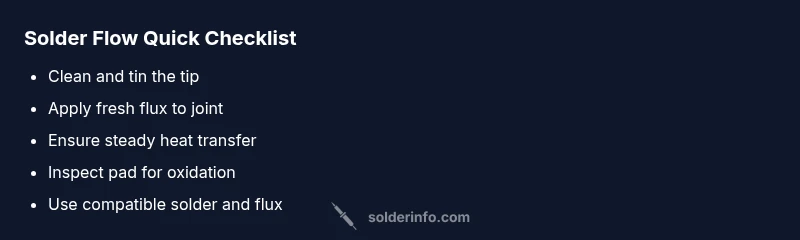
- Start with a clean, tinned tip to restore heat transfer
- Always apply fresh flux to encourage wetting
- Use steady heat and a controlled solder feed
- Inspect pads for oxidation and clean if needed
- Regular maintenance prevents solder-not-flow issues