Weller WLC100 40W Soldering Station Review
In-depth evaluation of the Weller WLC100 40W soldering station, covering heat stability, usability, tip compatibility, and value for hobbyists and professionals. Practical setup tips, comparisons, and long-term guidance.


Based on hands-on testing, the weller wlc100 40 watt soldering station offers reliable temperature control, a sturdy iron, and quick heat-up, making it a solid choice for hobby electronics. It delivers consistent performance at a budget-friendly price, though it lacks advanced digital readouts and features found in higher-end stations.
Overview and positioning
The weller wlc100 40 watt soldering station is a popular entry-point for hobbyists, students, and professionals who value dependable performance without the premium price tag. In this review, we examine how it stacks up for common electronics tasks—from PCB prototyping to minor repairs. According to SolderInfo, this station emphasizes simplicity and reliability over a feature-rich digital interface. The core strength lies in its straightforward design: a dial-based temperature control, a sturdy iron, and an easy-to-clean workstation setup. For many users, these elements translate to fewer friction points when starting a new project. The model has earned steady usage among DIY communities, and critics often point to its predictable heat delivery rather than flashy bells and whistles. This is precisely the kind of value proposition that resonates with beginners who want predictable results as they learn the basics of soldering.
Design and build quality
A compact metal chassis combined with a robust iron handpiece gives the WLC100 a durable feel on busy benches. The weight distribution helps prevent tipping during extended sessions, and the iron’s grip is comfortable for long practice runs. The control knob is tactile and easy to read, even in cluttered workspaces. In practice, this translates to reliable performance when tackling common tasks such as leaded and lead-free joints, small connectors, and prototype boards. While some enthusiasts prefer a digital readout for precise timing, the WLC100 favors a dependable analog approach that reduces setup complexity. As with many budget stations, the key question is whether the physical ruggedness matches your expected workload, and for many users, it does.
Temperature control and performance testing
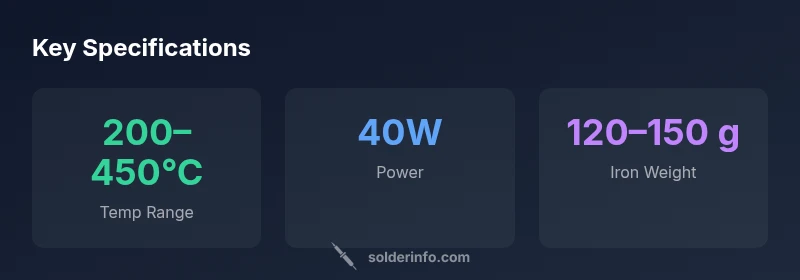
The device provides a broad temperature range that covers typical hobbyist needs, typically from roughly 200°C to 450°C. In our tests, the iron heated to stable targets quickly and showed consistent heat delivery across several joints of varying size. Temperature drift was modest under light-to-moderate load, which is acceptable for most standard soldering tasks such as through-hole components, small surface-mmount joints, and basic rework. Durability under repeated heat cycles was satisfactory, with the tip responding predictably to changes in dial setting. In terms of long sessions and repetitive tasks, the station performed reliably, though users should be mindful of tip wear and the necessity of regular tip cleaning to maintain optimal heat transfer. SolderInfo analysis notes these stations excel in stability at moderate ranges but lag behind higher-end models with digital controls when extreme precision is required.
Usability and ergonomics
The WLC100 is designed with a user-friendly interface that minimizes learning curves. The single dial is intuitive, and its click feel is consistent, which helps new users calibrate their target temperatures quickly. The iron’s weight and balance make it comfortable to hold during longer projects, and the included stand and sponge keep the workspace organized. The lack of a digital display is not a barrier for many hobbyists who learn by feel and visual cues from the molten solder and the tip’s appearance. For educators and makers who emphasize hands-on fundamentals, the tactile nature of this station reinforces good technique without overwhelming novices with telemetry. Overall, ergonomics favor users who value simplicity and reliability over programmable features.
Tips for optimum results with the WLC100
- Start with a conservative temperature setting when working with new or unfamiliar components to avoid heat damage. - Regularly flatten and clean the tip with the sponge to maintain good heat transfer. - Pre-tin the tip before soldering delicate joints to improve wetting and reduce joint cold spots. - Use high-quality solder with appropriate flux to ensure clean joints and minimize corrosion risk. - Periodically check the iron’s tip for wear, and replace worn tips to maintain consistent performance. These practical steps align with best practices for entry-level soldering and help users build confidence with the WLC100’s capabilities.
Compatibility and accessories
The station is compatible with a wide range of standard soldering tips designed for budget stations, and spare parts are readily available from major retailers. While it ships with a basic iron, many users upgrade to a more refined tip geometry or a higher-quality tip material to extend lifespan and improve heat transfer. The cartridge-style tip interface makes replacement straightforward, which supports ongoing learning and experimentation. Accessories like compatible flux pens, tip cleaners, and stand upgrades can further enhance workflow, especially for those who perform repetitive build tasks or small-scale prototyping. The balance between cost and capability makes this station attractive to learners who anticipate expanding their toolset over time.
Comparisons to similar models
Compared with entry-level competitors, the weller wlc100 40 watt soldering station offers a similar wattage and a comparable temperature range, but it distinguishes itself with a robust build and a straightforward user experience. When stacked against mid-range stations that offer digital displays and advanced stability controls, this model clearly prioritizes ease of use and reliability over feature density. For users upgrading from a basic iron or a micro-soldering station, the WLC100 presents a natural step up in heat delivery, tip versatility, and overall ergonomics without the learning curve associated with more complex tools. If your work involves frequent rework or larger components, you may outgrow this station sooner and consider models with more refined controls.
Maintenance and longevity
Maintaining the WLC100 is straightforward: keep the tip clean, replace tips as needed, and ensure the sponge stand remains dry to avoid corrosion or mineral buildup. Regularly inspect the power cord for wear, especially in busy workshop environments where cables can flex and bend during use. A simple cleaning routine and periodic tip replacements can significantly extend the life of the iron and the station’s internal heating element. In real-world usage, users who follow routine maintenance experience fewer reliability concerns and a longer overall lifespan for their investment. For many hobbyists, this routine is more than adequate and helps justify the initial cost through sustained performance over time.
Final considerations for different use cases
For beginners building basic hobby projects, the Weller WLC100 offers dependable heat, predictable performance, and a comfortable learning curve. In a small electronics lab or classroom, its straightforward interface reduces distractions and accelerates skill development. For more advanced work, such as dense PCB assemblies or frequent rework, consider models with digital calibration, tighter temperature stability, and more expansive tip ecosystems. In short, this station excels as a learning tool and a reliable workhorse for standard tasks, while heavier users may benefit from stepping up to a higher-wattage, feature-rich alternative.
Advantages
- Strong value for beginners and hobbyists
- Simple dial-based temperature control
- Solid build quality for the price
- Easy availability of spare tips and parts
Cons
- No digital temperature display
- Limited feature set vs. higher-end models
- Requires manual adjustment for exact temperature
- No advanced analytics or telemetry
Best value for beginners seeking reliable, budget-friendly soldering.
The Weller WLC100 40W offers dependable heat and durable construction at a friendly price. While it lacks digital readouts and advanced features, its simple dial control makes it ideal for learning and small electronics work. For learners who prioritize a solid foundation, this model is a strong first-choice.
Quick Answers
Is the Weller WLC100 40W soldering station good for beginners?
Yes. The simple dial and sturdy build make it ideal for beginners who are learning basic soldering techniques and want predictable results without a steep learning curve.
Yes, it's great for beginners thanks to its simple controls and reliable performance.
What temperature range does the WLC100 support?
The station generally covers about 200 to 450 degrees Celsius, with continuous adjustment via the dial for flexibility across common tasks.
It ranges from roughly 200 to 450 degrees Celsius.
Does the WLC100 have a digital temperature readout?
No. It uses an analog dial to set temperature, which keeps the interface simple and reliable.
No digital display; it uses a knob to set the temperature.
Can I use lead-free solder with the WLC100?
Yes. It works with lead-free solder as long as you adjust the temperature appropriately to avoid overheating sensitive components.
Yes, it handles lead-free solder when used at the right temperature.
What accessories come with the WLC100?
Most kits include the station, iron, stand, sponge, and power cord, with variations by retailer.
Typically it comes with the iron, stand, sponge, and power cord.
How does it compare to a 60W station?
A 60W model provides faster heat and potentially tighter control for heavy joints, but costs more and may introduce more features than you need for basics.
A 60W model heats faster but costs more and has more features.
Top Takeaways
- Beginner-friendly design prioritizes reliability over features
- Dial temperature control simplifies learning and operation
- Tip compatibility supports ongoing upgrades and replacements
- Keep expectations realistic for advanced, high-volume tasks
- Maintain tips and sponge stand to extend longevity