How to Protect Soldering Iron Tip: Essential Techniques
Learn proven methods to protect soldering iron tips, extend their life, and improve joint quality with expert guidance from SolderInfo.


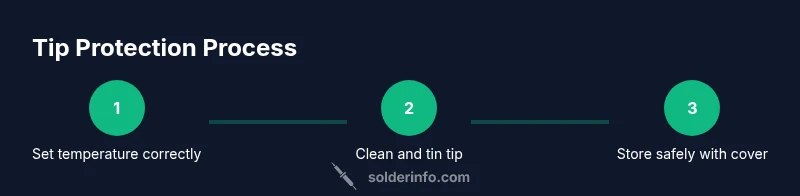
Protecting a soldering iron tip starts with a clean, properly heated tip. Steps include setting an appropriate temperature, cleaning with a damp sponge or brass wool, lightly tinning, using flux sparingly, and storing with the tip covered. Regular maintenance and good techniques extend tip life and improve joint quality. This quick guide covers the essentials.
Why how to protect soldering iron tip matters
If you're wondering how to protect soldering iron tip, the answer begins with consistent care and the right habits. According to SolderInfo, tip health directly affects solder joint quality, heatsup time, and consumable cost. A well-maintained tip heats evenly, deposits solder smoothly, and resists oxidation that can ruin joints. For hobbyists and professionals alike, protecting the tip reduces waste, improves precision, and shortens troubleshooting time when projects run long. A simple routine—keep the tip clean, tin it lightly, and store it properly—pays dividends in reliability and speed.
Common causes of tip degradation
Soldering tips degrade for several reasons. Oxidation from exposure to air without proper tinning creates a dull,crumbly surface that refuses to wet correctly. Overheating or prolonged heat soak damages the protective plating, accelerating corrosion and pitting. Contaminants from old solder, flux residues, or dirty pads can burn onto the tip, forming insulating layers that hinder heat transfer. Even poor storage, such as leaving a hot tip resting on a bare metal surface, invites oxidation. Understanding these causes helps you tailor your care routine.
Core strategies to extend tip life
To protect the tip, adopt a multi-pronged approach. First, always keep the tip clean and lightly tin it after each session. Second, maintain a temperature appropriate for the solder you use, avoiding unnecessary heat that erodes plating. Third, use flux correctly and sparingly, ensuring residues are wiped away with a non-abrasive cloth. Fourth, clean with the right tools—soft brass wool or a damp sponge are gentler than rough abrasives. Fifth, store the tip in a safe, covered position to minimize exposure to air. Finally, perform periodic tip conditioning with a dedicated tip cleaner and re-tin before reuse. This combination preserves plating, improves wetting, and reduces waste.
Daily maintenance routine for tip health
Create a simple daily routine that fits your workflow. Before starting work, inspect the tip for corrosion or wear. During soldering, wipe excess flux on a lint-free cloth and avoid stacking heat on one spot. After finishing, clean the tip, re-tin lightly, and place the iron in its stand with the tip protected by a cap or silicone cover. Schedule a weekly deep clean with isopropyl alcohol and a brass cleaner to remove stubborn residues. A consistent routine minimizes surprise tip failures and keeps joints sharp.
Troubleshooting common tip problems
If you notice uneven heat transfer, dull appearance, or poor wetting, your tip is signaling maintenance is due. Oxidation can be reversed by cleaning and re-tinning; if oxidation recurs quickly, the tip plating may be worn and require replacement. A pitted or flaked surface means you’ve lost protective plating and should replace the tip. Residues from flux or solder can carbonize and impede heat transfer; wipe the tip with IPA and re-tin. In jewelry or electronics work, improper tip geometry can hinder performance; select the correct tip shape for the task to avoid excess heat application.
Quick reference: best practices and tools
- Always use a temperature-controlled soldering iron and set it to a moderate, task-appropriate temperature.
- Clean the tip with a damp sponge or brass pad while it’s hot, then wipe with a lint-free cloth.
- Tin lightly after cleaning and before storing; don’t leave the tip dry.
- Use flux judiciously and clean flux residues promptly after soldering.
- Store the tip covered or in a protective cap to limit oxidation between sessions.
Tools & Materials
- Soldering iron (temperature-controlled)(Choose a model with a stable temperature range suitable for your solder (electronics typically use lower temps than plumbing or jewelry).)
- Solder (rosin-core, lead-free or lead-based)(Rosin-core flux reduces oxidation and eases wetting; select lead-free if needed for safety and compliance.)
- Flux pen or flux paste(Use sparingly; a thin, even layer improves wetting without leaving excessive residue.)
- Wet sponge or brass tip cleaner(A damp sponge should be used with care; brass cleaners are gentler on tips over time.)
- Isopropyl alcohol (70-99%)(For removing flux residues and debris; ensure the tip is dry before tinning.)
- Tip tinner/conditioning fluid (optional)(Useful for reviving heavily oxidized tips when a professional cleaner isn’t available.)
- Heat-resistant mat and stand(Keeps the work area safe and reduces accidental heating of surfaces.)
- Lint-free cloth or kimwipe(Used to wipe away residues without leaving fibers on the tip.)
Steps
Estimated time: 60-90 minutes
- 1
Power on and set appropriate temperature
Power on the soldering iron and select a temperature suitable for the solder you’re using. Start at a conservative setting and adjust upward only if joints aren’t wetting properly. This prevents tip degradation from excessive heat.
Tip: Always verify your temperature with a probe or iron readout before touching any component. - 2
Clean the tip while hot
Wipe the tip on a damp sponge or brass cleaner to remove oxidation and debris. Do this briefly and gently to avoid cooling the tip excessively. A clean, tinned surface improves heat transfer and joint quality.
Tip: Avoid aggressive scrubbing—gentle, frequent cleaning preserves tip plating. - 3
Tin the tip lightly after cleaning
Apply a small amount of solder to the tip to form a shiny, protective layer. This prevents rapid oxidation when the iron is resting between joints. Re-tin if the tip appears dull or oxidized.
Tip: A thin tin makes wetting easier on the next joint. - 4
Use flux sparingly and correctly
Apply flux only where needed for the joint. Excess flux can carbonize and create insulating residues that impede heat transfer. Wipe off any excess flux after soldering.
Tip: Flux should be used as a facilitator, not a crutch for poor technique. - 5
Solder joints with proper technique
Apply solder to the joint, not directly to the tip, and remove heat as soon as the joint is fully wetted. Prolonged heat exposure damages tip plating and can lift pads.
Tip: Practice a gentle, quick motion to minimize heat stress. - 6
Store the iron safely with the tip protected
Place the iron in its stand with the tip pointing away from lines of travel and cover the tip if available. This reduces exposure to air and moisture, slowing oxidation.
Tip: Always ensure the iron is off and cool before moving or putting away. - 7
Schedule routine tip maintenance
Create a regular maintenance cadence: weekly cleaning, monthly deep cleaning, and occasional tip replacement when plating shows wear. Routine care prevents sudden tip failures during critical work.
Tip: A proactive schedule saves time and money in the long run.
Quick Answers
What is the best practice to protect a soldering iron tip?
Best practice includes cleaning the tip while hot, tinning lightly, using flux correctly, and storing with the tip protected. Pair these with a temperature-controlled iron for consistent performance.
Clean the tip while hot, then tin it, use flux sparingly, and store the tip protected for best results.
Should I tin the tip before each use?
Yes, lightly tin the tip before starting to prevent oxidation and improve wetting. If the tip looks dull, clean it first and re-tin.
Lightly tin the tip before you start to keep it protected and ready to wet joints.
Can using too much flux harm the tip?
Flux residue can carbonize and insulate the tip, reducing heat transfer. Use flux sparingly and clean residue after soldering.
Too much flux can cause buildup; use just a small amount and wipe away residues afterward.
How often should I replace tips?
Replace tips when they become pitted, worn, or unable to wet properly after cleaning and tinning. Regular maintenance can extend tip life, but wear is inevitable over time.
If the tip is visibly worn or won’t wet properly, it’s time to replace it.
Is it safe to leave the iron on standby?
Turn off the iron if you’ll be away for an extended period. When in use, keep the tip elevated from surfaces and cover when not in use to slow oxidation.
Turn the iron off when idle and cover the tip to protect it.
Does tip protection differ for electronics vs jewelry work?
The core principles are the same, but jewelry work often requires more precise control and different tip shapes. Electronics work benefits from smaller tips and lower temperatures for delicate pads.
The same care applies, but tip choice may vary by task.
Watch Video
Top Takeaways
- Protect tip life with a disciplined routine
- Tin the tip after cleaning to prevent oxidation
- Use appropriate temperature and minimal flux for best results
- Clean and store the tip properly to minimize degradation
- Regular maintenance prevents costly tip replacements