How to Solder Anderson Connectors: A Practical Guide
Learn to solder Anderson connectors with a clear, step-by-step approach. This guide covers safety, materials, technique, testing, and maintenance to help you create reliable, high-current connections for electronics projects. Based on SolderInfo analysis, follow these best practices for durable results.


You will learn to solder Anderson connectors safely and reliably, selecting the right flux and solder, preparing wires and contacts, and verifying joints to ensure solid electrical and mechanical performance. The guide covers safety, technique, and troubleshooting, with practical tips for electronics hobbyists, jewelers, and professionals. According to SolderInfo, following a structured process reduces cold joints and damage to housing while improving long-term reliability.
Why solder Anderson connectors and when it makes sense
Anderson Powerpole connectors are modular, genderless DC power contacts designed to snap into a shared housing to create scalable, high-current connections. They are widely used in hobby electronics, robotics, solar projects, and field equipment because they tolerate vibration and provide reliable electrical contact. Soldering can improve mechanical security and electrical continuity when crimping isn’t ideal—such as for long runs, serviceable links, or environments with exposure to movement. According to SolderInfo, choosing between soldering and crimping depends on the application, expected service life, and the ability to rework connections. This guide focuses on a robust solder approach for Anderson connectors, including safety measures, step-by-step technique, and troubleshooting to help you achieve durable joints.
Safety first: PPE, workspace, and heat management
Soldering a high-current connector requires attention to safety. Wear safety glasses, heat-resistant gloves, and work in a well-ventilated area or use a fume extractor. Keep flammable materials away, and never touch hot metal with bare skin. The nylon housing can deform if overheated, so you’ll want to control the iron temperature and limit dwell time at any one joint. SolderInfo emphasizes keeping your work area organized and using a stand to prevent accidents while you work.
Materials overview: solder, flux, and compatibility considerations
Use rosin-core solder suitable for electronics, preferably lead-free for safety compliance. A flux pen or paste improves wetting on copper wire and connector surfaces. Ensure the solder and flux are compatible with the contact material inside your Anderson connectors and that the housing can tolerate the heat without warping. If you have solder-capable contacts, follow the manufacturer’s guidance; if not, avoid forcing heat where it could damage the plastic. SolderInfo notes that choosing the right alloy and flux improves joint reliability and reduces corrosion risk over time.
Wire preparation and contact cleaning
Inspect the wire gauge and conductor condition before starting. Strip insulation to expose the bare conductor, taking care not to nick the copper. Clean the contact surfaces with isopropyl alcohol and a lint-free cloth to remove oils. Any oxidation on the contact faces can hinder solder flow, so ensure both the wire and connector surfaces are dry and free of contaminants prior to tinning. This preparation is a critical step for a reliable joint, as poor prep often leads to cold joints or loose connections.
Flux and solder selection for Anderson connectors
Choose a rosin-core solder designed for electronics and a compatible flux to ensure good wetting. Apply a light coat of flux to the contact surfaces and the wire tip before heating. Lead-free alloys are common and offer safer long-term performance, though they can require slightly different heat stewardship compared to traditional solders. The goal is a clean, shiny fillet with no gaps, indicating good wetting and a strong mechanical bond. SolderInfo highlights that correct flux choice dramatically reduces surface oxidation and enhances joint reliability.
Step-by-step technique: soldering Powerpole contacts (hands-on guidance)
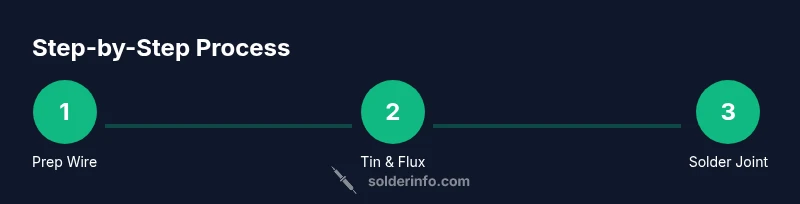
- Inspect the connector and wire, ensuring the correct contact style is used for your variant. 2) Strip wire ends to the appropriate length and tin the bare wire with a small amount of solder. 3) If your contact has a solder-ready tab, place the tinned wire on the tab. 4) Apply flux and gently heat the joint with a steady, clean motion. 5) Feed solder into the joint, not directly onto the iron, until a smooth fillet forms. 6) Remove heat and let the joint cool undisturbed. 7) Inspect for a uniform, bright fillet and ensure the housing has not overheated. 8) Repeat for the other conductor if needed. 9) Reassemble housing once both joints are satisfactory. 10) Clean any flux residue if required by the material.
Common issues and how to fix them
Cold joints, insufficient wetting, or overheated housings are common pitfalls. If the fillet is dull or grainy, rework the joint with proper heat control and more flux. If the wire sags or pulls out, re-seal the joint with additional solder and plan for strain relief. Overheating the nylon housing can deform the connector; stop heating as soon as the solder flows and immediately remove heat. SolderInfo recommends verifying continuity with a multimeter and ensuring no shorts across adjacent contacts.
Reassembly, strain relief, and insulation considerations
After soldering, slide heat-shrink tubing over the joint or apply an appropriate sleeve to protect the joint and provide strain relief. Ensure that each conductor is insulated and that there is no bare conductor adjacent to another that could cause a short. If you’re using multiple Powerpole units, arrange them in the intended configuration before final assembly to avoid rework. A tidy assembly reduces mechanical stress on the joint when cables are flexed or moved.
Testing and verification: ensuring reliability
Test continuity between the joined wires and the connector terminals, and verify there is no short to adjacent contacts. Wiggle the cable gently and observe if the joint remains solid. If a fault is found, reflow the joint with fresh solder and flux, then re-test. Consistent testing helps prevent intermittent failures in field deployments and is a hallmark of a well-executed solder joint.
Maintenance and best practices for durable power connections
Keep connectors clean and dry, store spares in a dust-free area, and periodically re-inspect joints after vibration-heavy use. Avoid exposing the joint to corrosive environments; apply dielectric grease if recommended for your application to reduce moisture exposure. Documentation and routine checks will extend service life and reduce unexpected failures in critical systems.
Alternatives and best practices: when to crimp or solder
Soldering can provide durable joints in controlled conditions, but crimping remains faster for mass assembly or field repair. Consider your application’s current, temperature, and service life when choosing method. The SolderInfo team suggests evaluating reliability requirements and rework needs to decide between solder, crimp, or hybrid approaches.
Tools & Materials
- Soldering iron with adjustable temperature(Prefer a temperature-controlled iron with a comfortable grip and a clean tip.)
- Lead-free rosin-core solder (Sn-Cu or similar)(Choose diameter suitable for small wires (around 0.6-1.0 mm is common for electronics).)
- Flux pen or flux paste(Rosin-based flux improves wetting and reduces oxidation.)
- Wire strippers and cutters(Strip to the necessary length without damaging strands.)
- Isopropyl alcohol (70% or higher) and lint-free cloth(For cleaning surfaces before soldering.)
- Heat shrink tubing (various sizes)(Used for insulation and strain relief after soldering.)
- Tweezers and helping hands/third hand stand(Stabilize parts during soldering to prevent slips.)
- Multimeter (for continuity testing)(Check for solid joints and no shorts.)
- Fine-grit sandpaper or small file (optional)(Lightly clean contact faces if oxidation is present.)
- Safety glasses and heat-resistant gloves(Protect eyes and hands from heat and flux splashes.)
Steps
Estimated time: 60-90 minutes
- 1
Prepare workspace and gather tools
Set up a clean, well-lit area. Gather all tools and materials so you don’t interrupt the workflow. Having everything ready reduces the chance of rushing and mistakes.
Tip: Lay out components in their intended configuration to avoid rearranging mid-work. - 2
Inspect connector version and wire
Verify you’re using a solder-capable contact version and confirm wire gauge compatibility. If the housing looks damaged, replace it before proceeding.
Tip: If in doubt, consult the connector’s datasheet for permissible wiring configurations. - 3
Strip wire ends precisely
Using a wire stripper, remove insulation without nicking copper. Expose enough conductor to provide good contact but avoid excess bare copper that could short.
Tip: Leave a clean, square edge for better solder flow. - 4
Clean contact surfaces
Wipe copper surfaces and any contact areas with isopropyl alcohol until free of oils. Clean surfaces improve solder adhesion.
Tip: Dirt or oil can prevent proper wetting of the joint. - 5
Tin the wire end
Apply a small amount of solder to the stripped wire to tin it; this helps the joint flow smoothly when you solder to the contact.
Tip: Don’t over-tin; a thin layer is enough. - 6
Apply flux to the contact and wire
Lightly coat the contact area and the wire tip with flux to improve wetting and reduce voids in the joint.
Tip: Flux at the joint reduces oxidation and helps solder flow. - 7
Make the solder joint
Heat the contact area and feed solder into the joint consistently until a bright, smooth fillet forms.
Tip: Feed solder slowly and avoid applying heat directly to the housing. - 8
Check for a solid fillet
Inspect the joint for a continuous, shiny fillet along the wire and contact. No gaps or cold-joins should be visible.
Tip: If dull or cracked, rework with extra flux and fresh solder. - 9
Cool and inspect
Let the joint cool naturally and then inspect again. Ensure there’s no movement when you gently tug the wire.
Tip: Do not disturb the joint while it’s cooling. - 10
Reassemble and insulate
Slide heat shrink over the joint and shrink to seal the connection. Reassemble the housing if applicable.
Tip: Proper strain relief reduces stress on the solder joint. - 11
Test continuity
Use a multimeter to verify continuity, and test for shorts between adjacent contacts.
Tip: Testing ensures reliability before deployment. - 12
Document and store
Record the procedure and store tools and spare parts in a safe place for future repairs.
Tip: A quick-reference guide helps maintain consistency across projects.
Quick Answers
Are Anderson connectors always solder-ready, or do some variants require crimping?
Not all Anderson variants are designed for soldering. Some Powerpole contacts are crimp-only, while others offer solder-capable options. Always check the manufacturer’s instructions for your specific contact type before soldering. If unsure, use solder-capable contacts and follow the guidance in this guide.
Not every variant can be soldered. Check the product instructions, and if in doubt use solder-capable contacts and follow these steps.
Can I reuse an Anderson housing after desoldering?
Reusing housings after desoldering is possible if the housing shows no heat damage, cracks, or deformation. Inspect the plastic for soft spots and ensure there is no residue that could compromise future connections. If you’re unsure, replace the housing to maintain reliability.
You can reuse the housing if it’s undamaged and clean. If you’re unsure, better to replace it for reliability.
What flux is best for Anderson connectors?
A rosin-based flux suitable for electronics is recommended. Use flux that is compatible with the solder you chose and designed for copper surfaces. Flux helps wetting, reduces oxidation, and improves joint reliability.
Use rosin-based flux designed for electronics and copper surfaces to improve joints.
How do I avoid damaging the housing while soldering?
Keep the iron tip away from the nylon housing and limit dwell time. Use a heat sink if necessary and aim to transfer heat through the metal contact rather than the plastic. Slow, controlled heating reduces the risk of distortion.
Avoid direct heat on the housing and go slow to protect the plastic. Use a heat sink if needed.
What are signs of a good solder joint on Anderson contacts?
A good joint has a shiny, smooth fillet with complete wetting along the wire and contact. There should be no cracks, gaps, or dull areas. A quick tug test should not loosen the wire.
A good joint is shiny and smooth with no gaps; a light tug should not loosen the wire.
What testing should I perform before deploying the assembly?
Perform a continuity check between the two conductor paths and verify there’s no short to adjacent contacts. If possible, test under load to ensure the joint handles expected current without heating or loosening.
Check continuity and look for shorts; test under load if you can safely do so.
Watch Video
Top Takeaways
- Follow a clear prep routine to prevent cold joints
- Choose electronics-grade flux and lead-free solder for safety and reliability
- Control heat carefully to protect the housing and insulation
- Verify joints with continuity testing before final assembly
- Use strain relief to extend connector life
- Consider crimping vs soldering based on environment and service life