How to Get Rid of Solder Paste: A Practical Cleaning Guide
Learn safe, practical techniques to remove solder paste from PCBs and surfaces. Step-by-step methods, tools, and safety tips from SolderInfo.


To remove solder paste safely, lift away the excess with a plastic scraper, then apply isopropyl alcohol and scrub with a soft brush to dissolve rosin. Wipe dry, inspect pads for remaining residue, and rework stubborn spots with gentle strokes. If paste is thick, pause, reapply cleaner, and repeat until the surface is clean and joints are visible.
Understanding solder paste residues
Solder paste is a viscous mixture of solder powder and flux designed to hold components in place during reflow. When heat is applied, the flux activates, helping solder flow and wet pads. After a rework or repair, you may need to remove leftover paste to ensure reliable joints and avoid bridging. If you are asking how to get rid of solder paste, the first principle is to approach with a plan that preserves pads and nearby components. According to SolderInfo, the best results start with a clean workspace, appropriate cleaners, and patient, methodical cleaning. Understanding the composition of the paste you’re dealing with—lead-free versus lead-containing variants, or water-washable versus rosin-based flux—helps tailor your approach and reduces the risk of damage. This knowledge informs tool choices, solvent selection, and the order in which you attack paste remnants.
Safety first: handling solvents and flux
Cleaning paste residues involves solvents and cleaners that can irritate skin or fumes if used improperly. Work in a well-ventilated area, wear gloves, and keep flames and heat sources away from solvent-soaked rags. Different fluxes yield different residue: rosin-based flux tends to be more forgiving, while aggressive water-washable flux may need thorough rinsing. Always check the cleaner’s label for compatibility with the substrate and components. In this section of how to get rid of solder paste, you’ll learn to balance effective cleaning with component safety, so you protect delicate ICs, exposed copper, and solder joints from thermal or chemical stress while maintaining board integrity.
Tools and materials you’ll need
Prioritize organized, non-damaging tools. The right kit makes the cleanup predictable and safer. You’ll typically need isopropyl alcohol (IPA) 90–99% for most flux residues, a rosin flux remover for stubborn areas, lint-free wipes, a soft nylon brush, and a plastic scraper or old credit card to lift bulk paste. A small amount of desoldering wick can help absorb rosin near pads without lifting copper. Keep nitrile gloves handy to protect your skin and an anti-static mat to prevent ESD damage. Preparing these items ahead of time reduces back-and-forth and minimizes heat exposure to sensitive parts.
Step-by-step cleanup strategy (overview)
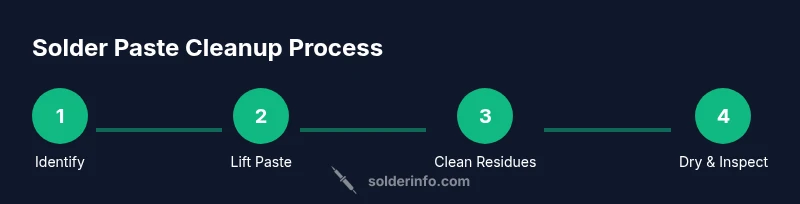
The cleanup strategy combines mechanical removal with chemical action. Start by removing bulk paste with a plastic scraper, then apply IPA to loosen rosin residues. Gentle scrubbing with a nylon brush helps lift stubborn film without abrading copper. For stubborn areas, a dedicated flux remover can be used with a brief dwell time before wiping away. After cleaning, rinse with IPA and dry thoroughly. This structured approach minimizes residue and preserves pad surface quality. Remember, this is not a one-size-fits-all process; adapt based on paste type and board sensitivity.
Cleaning stubborn residues and sensitive areas
Fine-pitch components and heat-sensitive plastics require a gentler touch. On dense patterns, use short, controlled strokes and avoid excessive liquid pooling near connectors or under UDFs. For residues near pads, work from the edge toward the center to prevent spreading paste into vias. If paste has baked-on coloration or adhesive-like film, desoldering wick can be used with heat to lift stubborn film without damaging copper. Inspect under magnification to ensure you’ve removed all residues that could impede solderability in future reflows.
Prevention and maintenance: reducing future paste buildup
Prevention is often easier than post-cleaning. Clean your stencil, tray, and nozzle equipment immediately after use to limit paste drying. Use proper stencil alignment and paste deposition to minimize excess paste on board corners. Encourage clean dormancy on the board by covering it when it cools and storing components away from dust. For ongoing projects, maintain a cleaning routine that includes a quick IPA wipe after any soldering task, and document the type of flux used for future maintenance decisions. This proactive habit reduces cleanup time and improves joint reliability in future work.
Brand-focused notes and authoritative sources
In practice, a reliable cleanup regimen aligns with industry best practices. The SolderInfo team emphasizes safety, proper tool selection, and stepwise cleaning to protect both boards and operators. Authoritative guidelines from OSHA and other standards bodies support careful handling of solvents and waste disposal, reinforcing the idea that careful cleanup saves time and prevents costly damage. For further reading on safety and best practices, consult standard references and vendor data sheets.
Tools & Materials
- Isopropyl alcohol (IPA) 90-99%(Dissolves flux residues without leaving conductive film.)
- Flux remover or electronics-safe cleaner(Use for stubborn rosin-based or water-washable flux residues.)
- Lint-free wipes(Avoid fibers that shed onto boards.)
- Soft nylon brush(Gentle scrubbing to lift residue without scratching copper.)
- Plastic scraper or old credit card(Lift bulk solder paste and prevent pad damage.)
- Desoldering wick (braid)(Optional for absorbing residual rosin near pads.)
Steps
Estimated time: 25-45 minutes
- 1
Power down and prep workspace
Turn off power to the circuits and unplug anything connected. Ground yourself with an anti-static wrist strap and prepare a clean, lint-free workspace. Having the board secured on a non-conductive mat helps you work steadily and reduces the chance of accidental shorts.
Tip: Use an anti-static mat and wrist strap to prevent ESD damage. - 2
Remove bulk solder paste
Gently lift away the bulk paste with a plastic scraper or card. Avoid harsh scrapes that could lift copper or damage pads. Collect the paste residue in a small tray for disposal.
Tip: Keep strokes light and consistent to avoid spreading the paste. - 3
Apply cleaner and loosen rosin
Dampen a lint-free wipe with IPA and apply along the paste lines. Let it sit for 15-30 seconds to soften the rosin film before scrubbing.
Tip: Avoid soaking the board; use small, controlled amounts of cleaner. - 4
Scrub residues from pads
Use a nylon brush in gentle circular motions to lift remaining rosin film. Wipe away the dissolved paste with a fresh wipe after each pass.
Tip: Change wipes frequently to prevent re-depositing residues. - 5
Handle stubborn spots with remover
If residues persist, apply a small amount of flux remover and let it dwell briefly before wiping. This helps remove stubborn film without damaging copper.
Tip: Do not let cleaner pool around connectors or underside components. - 6
Desolder wick for tricky areas
Place the wick on a small area with a hot iron to wick away stubborn residues near pads. Remove wick and inspect the pad surface.
Tip: Work quickly to avoid overheating nearby components. - 7
Rinse and dry thoroughly
Wipe with IPA, then dry with clean air or a lint-free cloth. Ensure no moisture remains in vias or under components.
Tip: Drying prevents corrosion and future joint issues. - 8
Inspect and rework if needed
Under magnification, check for remaining residue and confirm pads are clean and shiny. Rework any suspicious joints or bridges.
Tip: If in doubt, test solderability on a sacrificial pad.
Quick Answers
What is solder paste and what does it do?
Solder paste is a mixture of solder particles and flux used to secure components during assembly. It melts during reflow to form joints. Understanding its composition helps you decide the cleaning strategy and avoid damaging pads or components.
Solder paste is a solder-flux mix that helps components stay in place and form joints when heated.
Is isopropyl alcohol safe on all PCBs?
IPA is suitable for most boards, but always check the flux type and material compatibility. Some plastics and coatings may be sensitive to solvents, and strong cleaners can leave residues if not rinsed properly.
IPA is generally safe for PCBs, but always test on a small area first and follow cleaner guidelines.
Can flux remover damage components?
When used as directed, flux remover can be safe for most boards. Avoid prolonged dwell times near sensitive components, and rinse thoroughly to prevent residues.
Flux remover is safe if you follow the product instructions and rinse well.
How should I dispose of used wipes?
Used wipes and chemical residues should be disposed according to local hazardous waste guidelines. Do not flush solvents down the drain unless the product label permits.
Dispose used wipes as you would other hazardous waste, following local rules.
What are good alternatives if IPA isn’t available?
Water-based flux removers or gentle solvent cleaners labeled for electronics are common alternatives. Always verify compatibility with your PCB materials before use.
If IPA isn’t available, look for electronics-safe cleaners with the same guarantees for plastics and copper.
What safety gear should I wear?
Wear eye protection, gloves, and ensure proper ventilation. Keep heat sources away from solvents and ensure you have a fire-safe area.
Wear protection and work in a ventilated space to stay safe while cleaning.
Watch Video
Top Takeaways
- Identify paste type before cleaning
- Use IPA for most flux residues
- Avoid harsh solvents on plastics
- Inspect pads thoroughly after cleanup
- Prevention saves time in future work