3D Print Solder Holder: DIY Guide for a Neat Soldering Station
Learn how to design, print, and customize a 3d print solder holder to organize solder reels, flux, and tools at your workstation. This in-depth guide covers design considerations, materials, printing settings, and maintenance for electronics, jewelry, and plumbing projects.


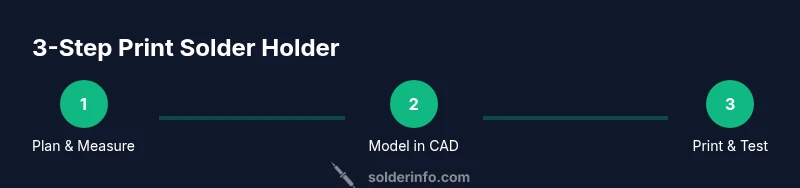
By following this guide, you will design and print a custom 3d print solder holder tailored to your bench. You will define compartments for reels, tips, and flux, choose heat-resistant filament, and run a safe print with a reliable post-processing plan. This is a practical, step-by-step approach for hobbyists and professionals alike.
Why a 3d print solder holder helps hobbyists
Having a dedicated 3d print solder holder reduces bench clutter and supports safer, more efficient work sessions. A well-organized holder keeps solder reels, flux bottles, tips, and small cleanup tools within arm’s reach, so you can focus on the task instead of searching for parts. According to SolderInfo, consistent organization improves accuracy and reduces workflow interruptions across electronics, jewelry, and plumbing soldering workflows. A purpose-built holder also helps protect heat-sensitive components from accidental contact and minimizes flux spills by providing dedicated storage zones. In a typical setup, you’ll want sections that fit common reel diameters, a clip for flux bottles, a magnet strip for small tools, and a small tray for tip-cleaning swabs. The result is a compact, modular accessory that scales with your projects and reduces waste from dropped components. This guide uses the term 3d print solder holder to refer to any printer-made fixture designed to hold solder-related items, not a single fixed model.
Tools & Materials
- 3D printer(Any FDM printer capable of 0.2 mm layer height and reasonable tolerances.)
- Filament (PLA, PETG, or ABS)(PETG or ABS recommended near heat sources; PLA is easier for beginners.)
- Calipers or ruler(Used to measure reel and clip dimensions for accurate tolerances.)
- CAD software(Free options are fine; design or modify a model to fit your needs.)
- Solder reels and flux bottles for testing(Helps validate fit and spacing during testing.)
- Sandpaper or deburring tool(Smooth edges after printing to prevent snags.)
- Safety gear (gloves, eye protection)(Wear when handling hot tools or sharp edges.)
Steps
Estimated time: 2-3 hours total
- 1
Define your requirements
Identify what you need the holder to store: solder reels, flux bottle, tips, cleaning swabs, and a small waste tray. Record the number of reels (and their typical diameter), the amount of vertical clearance above the benchtop, and whether you want a wall-mount option. This step sets the boundary conditions for your CAD prototype.
Tip: Sketch a quick layout on paper before opening CAD to capture your ideal compartments. - 2
Sketch layout and constraints
Create a rough diagram showing where each item will live. Consider accessibility when you reach for a reel and the angle at which flux bottles are removed. Note mechanical constraints like existing clamps or nearby tools to ensure the design fits your bench without collisions.
Tip: Consider modularity—design sections that can be printed separately and swapped later. - 3
Model the holder in CAD
Build the model with the compartments sized to your measured reels, clips sized for flux tubes, and a tray for waste. Use fillets on edges to reduce sharp corners and add simple features for a wall-mount option if desired. Keep wall thickness reasonable to balance strength and print time.
Tip: Use parametric modeling so you can quickly adjust dimensions if a reel slightly differs. - 4
Export and slice for printing
Export your model in a standard format (STL/OBJ) and import into your slicer. Set a conservative wall thickness and brim for adhesion. Choose a layer height around 0.2 mm and enable minimal support if the design has overhangs.
Tip: Print a small test piece first to verify fit before committing to a full print. - 5
Print and perform initial fit test
Print the first revision and test all compartments for fit. Check reel clearance, clip tension, and any access angles. If something binds or is too loose, note the adjustment needed.
Tip: document measurements during testing to streamline the next iteration. - 6
Iterate and finalize
Refine the design based on test results. Increase clip tolerance if needed, slightly enlarge clearances for heat considerations, and add features like anti-slip pads. Produce a final version and a back-up spare part file.
Tip: Keep versioning of your STL files to track improvements.
Quick Answers
What is a 3d print solder holder and why would I use one?
A 3d print solder holder is a printer-made fixture designed to organize solder reels, flux, and related tools. It helps reduce bench clutter, improve safety, and speed up your workflow by keeping essential items in predictable places.
A 3d print solder holder is a printer-made organizer that keeps solder and tools neatly in reach for faster, neater work.
What materials are best for printing a solder holder?
PETG offers good heat resistance and chemical stability, making it a common choice near soldering stations. ABS is another option but requires higher printing temperatures and ventilation. PLA prints are easier but less heat-tolerant, so reserve them for less-heat areas.
PETG is a solid choice for near heat, with ABS as an alternative; PLA is okay for non-heat zones.
Will a 3d printed holder withstand heat from soldering?
A well-designed holder with heat-resistant filament should tolerate typical bench conditions. Avoid direct exposure to hot tips and consider adding metal inserts or heat shields if needed. Always test with your actual workflow.
As long as you use the right material and keep hot parts away, a 3d printed holder can handle typical soldering tasks.
Can I adapt the holder for different solder reel sizes?
Yes. Design adjustable clips or modular compartments that can be swapped or resized. Keeping the main body modular makes it easier to accommodate variations in reel diameter or width.
Absolutely—modular designs let you swap parts to fit different reels.
Do I need professional CAD software to design one?
Not necessarily. Free CAD tools are sufficient for creating a basic holder. Start with simple sketches, then progress to parametric models if you want easy future adjustments.
You can start with free CAD options and upgrade later if you want more complex features.
How should I maintain and clean my holder?
Regularly wipe away flux residue and dust. If prints get sticky, wipe with isopropyl alcohol and dry. Inspect for cracks after repeated heating and replace parts as needed.
Wipe, inspect, and replace worn pieces as part of routine maintenance.
Watch Video
Top Takeaways
- Plan compartments before CAD to save time
- Choose heat-resistant filament for near-heat areas
- Test-fit pieces to ensure reliable operation
- Iterate design based on real-world use
- Keep a clean, modular design for future upgrades